
Now Reading: Why a Heating Pad Is Essential for Mobile Phone Repairs (And How to Use it)
-
01
Why a Heating Pad Is Essential for Mobile Phone Repairs (And How to Use it)

Why a Heating Pad Is Essential for Mobile Phone Repairs (And How to Use it)
In modern smartphone and tablet repairs, controlled and even heating is a critical part of the repair process. Most devices today are sealed with strong factory adhesive to improve durability, water resistance, and structural strength. Without proper heating, opening a phone safely becomes very difficult and risky.
In this guide, we’ll first explain why a heating pad is necessary for phone repairs, why it is the best option for DIY repairs, and common heating challenges. We’ll also mention the heating pad brand we personally use and recommend, without making the entire guide brand-focused.
Why Heating Is Required in Smartphone Repairs
Manufacturers use industrial-grade adhesive to seal components such as:
- Back glass panels
- Displays and digitizers
- Batteries
- Internal brackets and shields
Trying to open a device without softening this adhesive can result in:
- Cracked back glass or screens
- Torn display or fingerprint cables
- Bent frames
- Permanent display damage
Using heat softens the adhesive, allowing parts to separate smoothly with minimal force. This not only protects the device but also improves repair accuracy and success rate.
Why a Heating Pad Is Better Than Other Heating Methods
There are different ways to apply heat during phone repairs, including heat guns and hair dryers. However, for most DIY and professional repairs, a heating pad is the safest and most reliable option.
Key Benefits of Using a Heating Pad
- Even heat distribution across the device
- Stable and controlled temperature
- Reduced risk of overheating sensitive components
- Safer for beginners and DIY repairs
- Ideal for screens, back glass, and battery removal
Unlike heat guns, a heating pad does not blow hot air directly onto components, which helps prevent localized overheating and accidental damage.
Why Heating Pads Are Best for DIY Repairs
For DIY repairs, consistency and safety matter more than speed. Heating pads provide:
- Predictable heating results
- Less chance of damaging plastic parts
- Better control for users with limited repair experience
- Easier handling when working slowly and carefully
This makes heating pads especially suitable for first-time repairs, home workshops, and step-by-step repair guides.
The Heating Pad We Use and Recommend
While many heating pads are available on the market, we personally use and recommend a reliable professional-grade heating pad that provides accurate temperature control and even heat distribution.
This type of heating pad is:
- Widely used by repair technicians
- Suitable for phones and tablets
- Ideal for back glass and display removal
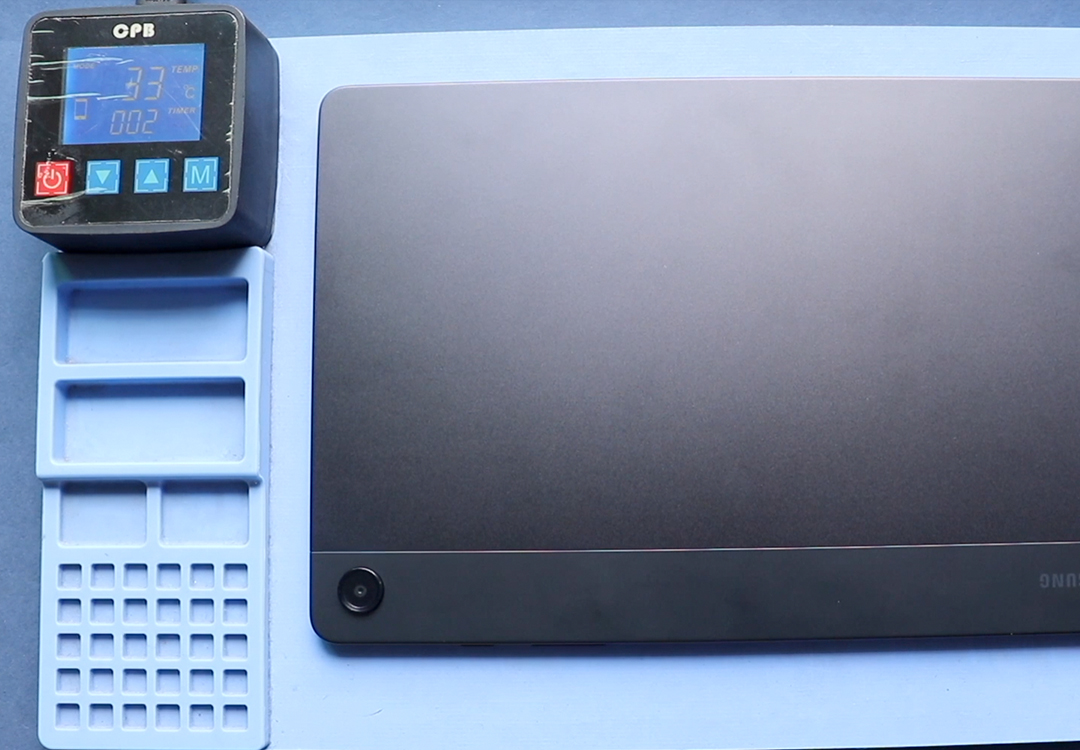
👉The Heating pads we are recommending is CPB Heating Pad. You can find the product from below link.
We always recommend choosing a heating pad with adjustable temperature control rather than fixed-temperature models.
How to Use a CPB Heating Pad (Step-by-Step Process)
A CPB heating pad is designed to provide stable, even, and controlled heat, making it ideal for phones, tablets, and larger devices when used correctly.
Step-by-Step Process
- Power off the device completely
Always switch off the device and remove the SIM tray before placing it on the heating pad. - Choose the correct heating pad size
CPB heating pads are commonly available in two sizes:- Small CPB Heating Pad – Best for smartphones and mini tablets
- iPhones
- Samsung Galaxy phones
- Small Android tablets
- iPad Mini
- Large CPB Heating Pad – Designed for tablets and large devices
- iPads (standard and Pro models)
- Microsoft Surface devices
- Large Android tablets
- Small CPB Heating Pad – Best for smartphones and mini tablets
- Set the temperature
Adjust the temperature based on the device type:- Smartphones: 70°C – 90°C
- Tablets / iPads: 80°C – 95°C
- Microsoft Surface devices: 85°C – 95°C
- Place the device flat on the pad
Position the device with the screen or back glass facing down, ensuring full contact with the pad surface. - Allow even heating
Let the device heat for the recommended duration:- Smartphones: 2–5 minutes
- Tablets / iPads: 5–10 minutes
- Surface devices: 8–12 minutes
- Test the adhesive
Use a plastic pick or opening tool to gently test the edge. If there is resistance, reheat before continuing. - Open the device gradually
Work in sections using suction cups and plastic tools. Never force the glass. - Reheat as needed
Adhesive cools quickly, especially on larger devices. Reheat the device during the opening process whenever resistance increases.
Devices That Need Extra Heating
Some devices use stronger adhesive, larger panels, or thicker glass and therefore require extra heating time and careful temperature control.
Smartphones
Examples include:
- Samsung Ultra series devices
- iPhone Pro and Pro Max models
- Phones with large back glass panels
- Older devices with hardened adhesive
Best practices:
- Increase heating time instead of temperature
- Heat in multiple short cycles
- Work on one edge at a time
Tablets and iPads
Tablets and iPads require more careful heating than smartphones because of their larger displays and stronger adhesive.
Why tablets need extra attention:
- Larger surface area
- Strong perimeter adhesive
- Thinner glass that cracks easily
Recommended heating guidelines for tablets/iPads:
- Temperature: 80°C – 95°C
- Heating time: 5–10 minutes (depending on model)
- Heat evenly across the entire edge
- Reheat sections frequently while opening
Heating pads are especially important for tablets because they provide even heat across a wide area, which is difficult to achieve with a heat gun.
Microsoft Surface and Other Sealed Tablets
Devices like the Microsoft Surface lineup are among the most challenging to open.
Why Surface devices need controlled heating:
- Extremely strong adhesive
- Display is bonded tightly to the frame
- High risk of screen cracking
Recommended heating guidelines:
- Temperature: 85°C – 95°C
- Heating time: 8–12 minutes
- Heat the front glass evenly (not the back)
- Work slowly and reheat frequently
For Surface and similar tablets, a heating pad is not optional—it is essential. Uneven or rushed heating is the most common cause of display failure.
Important: Always monitor device temperature closely.
Common Heating Issues and Solutions
Adhesive Not Softening Enough
Solution:
- Reheat the device for a longer duration
- Ensure the entire edge is evenly heated
Glass Cracking During Opening
Solution:
- Stop immediately and reheat
- Use thinner plastic picks
- Avoid metal tools
Overheating the Device
Solution:
- Do not exceed recommended temperatures
- Never leave the device unattended
Frame Bending or Damage
Solution:
- Reduce force
- Reapply heat instead of prying harder
Safety Tips When Using a Heating Pad
- Always power off the device
- Remove SIM tray before heating
- Avoid heating batteries directly
- Work slowly and patiently
- Never leave a device unattended on the pad
Final Thoughts
A heating pad is not just a convenience—it is an essential repair tool for modern smartphones and tablets. For DIY repairs especially, using a heating pad greatly reduces the risk of damage and increases repair success.
While many options exist, we recommend using a quality heating pad with accurate temperature control, like the one we use in our own repairs. Choosing the right heating method will make your repairs safer, cleaner, and more professional.


-
 01Samsung Galaxy A16 5G Battery Replacement | Full DIY Repair Guide
 -
02Samsung Galaxy A16 5G Screen Replacement | Step-by-Step Guide
-
03Google Pixel 6 Power Button Replacement Guide | Volume Button Flex Repair Guide- DIY Repair
-
04Samsung Galaxy A16 5G Back Cover & Camera Lens Frame Replacement Guide | DIY Repair
-
05Why a Heating Pad Is Essential for Mobile Phone Repairs (And How to Use it)
-
06How to Use a Heat Gun or Hair Dryer for Phone/Tablet Repairs
-
07Essential Repair Tools for Phone, Tablet & Laptop Repairs


