
Now Reading: iPhone 12 Taptic Engine Motor Replacement Guide
-
01
iPhone 12 Taptic Engine Motor Replacement Guide

iPhone 12 Taptic Engine Motor Replacement Guide
Today, we will show you how to replace the Taptic Engine / Vibrator Motor on the iPhone 12. If your phone has stopped giving haptic feedback, vibrations feel weak, or the device stays silent even for incoming calls, it usually points to a faulty Taptic Engine. This guide follows our repair process from the video and explains each step clearly so you can follow along safely.
Before starting the repair, make sure you have the proper tools. You can find the recommended tools listed in the description of the video. Having the correct tools ensures you won’t damage screws, rubber gaskets, or fragile internal flex cables.
Compatibility and Model Numbers
This repair guide based on iPhone 12 mobile phone. But this guide also compatible with iPhone12 Pro mobile phone.
Compatible Mode Numbers l A2403, A2172, A2402, A2404, A2407, A2341, A2406, A2408
Tools You Need
- Heating pad / heat gun / hairdryer
- Suction cup
- Plastic card pry tools / opening picks
- Phillips PH000 screwdriver
- Pentalobe P2 Screwdriver (for bottom screws)
- Tri-Point Y000 Screwdriver
- Adhesive (B7000 or double-sided frame adhesive)
- Bonding clips or rubber bands (optional but recommended)
How to Find Tools and Parts
- Heating pad – https://amzn.to/3H0tHzJ
- Portable Heat Gun – https://amzn.to/4mszih1
- Clamps https://amzn.to/3GYJT4w
- STREBITO 142 Piece Repair Tool Kit https://amzn.to/3UO1jUx
- Glue | Adhesive https://amzn.to/46exVxe
- Compatible Battery https://amzn.to/4fI15YG
- Silicone Work Repair Mat https://amzn.to/45Emz5l
Step 1 — Power Off the Device
Turn off the phone completely.
Remove the SIM tray using a SIM eject tool.
Next, undo the two bottom screws using a Pentalobe screwdriver.
These screws help seal the frame, so keep them safely aside.
Step 2 — Loosen the Display Adhesive
To open the iPhone 12, we need to soften the screen adhesive.
Here, we use a heating pad for consistent heat. You can also use a heat gun or even a hairdryer if that’s what you have.
Heat the edges gently—do not overheat.
Once warm, we lift the screen using a double-sided suction cup. This gives better grip, but a standard suction cup also works.
Use a plastic pry card or triangle picker to slide between the frame and display. Slowly work your way around the edges and loosen the water-resistant rubber gasket.
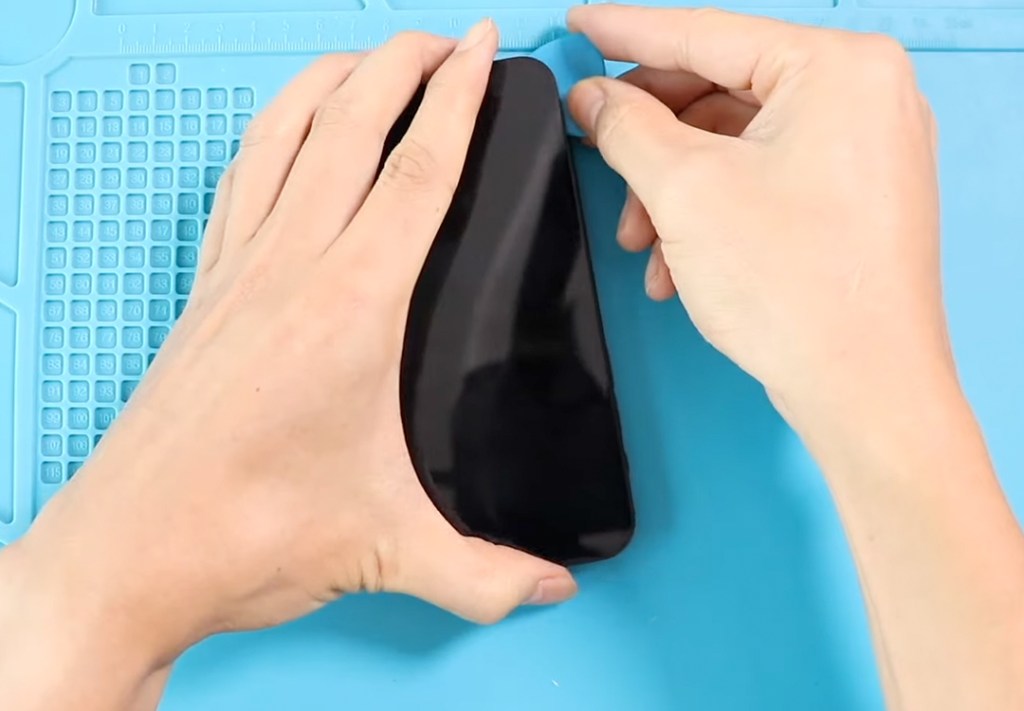
Step 3 — Lift the Display Like a Book
Once loose, lift the screen from the left side, just like opening a book.
Remove:
- 2 screws from the bottom shield
- 4 screws from the upper shield
Take out both shields.
Disconnect:
- The battery
- The earpiece assembly
- Both display connector plugs
Now you can fully separate the screen from the phone body.
Step 4 — Remove the Taptic Engine
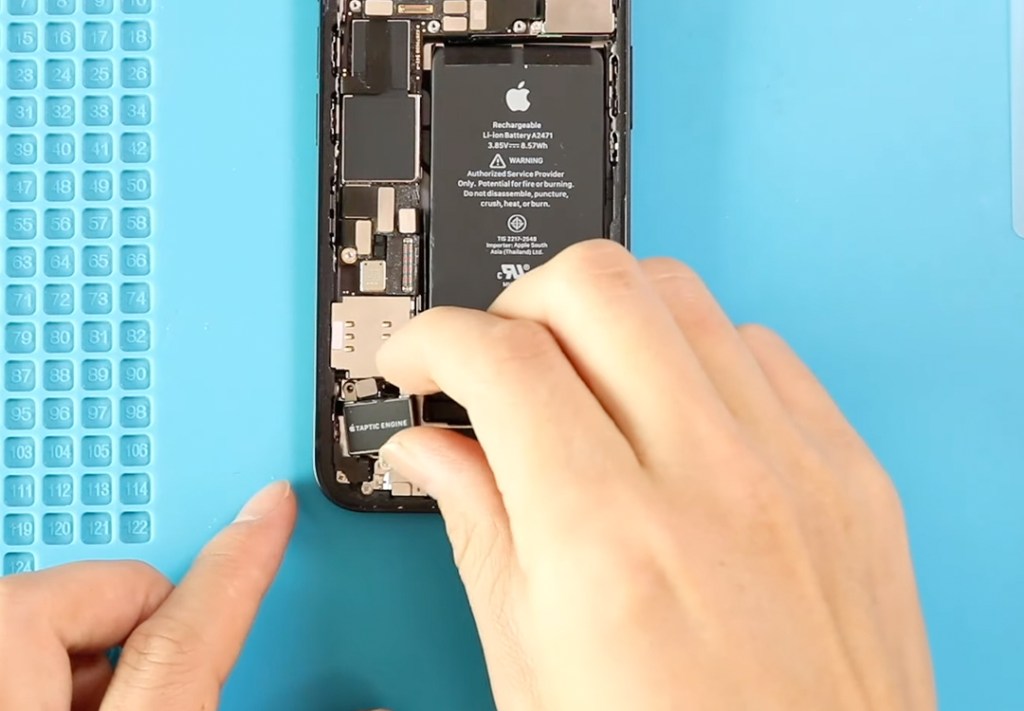
Locate the Taptic Engine at the bottom right area of the device.
Remove the Taptic Engine bracket by undoing two screws.
Next, remove the faulty Taptic Engine itself:
- Undo two screws
- Disconnect the Taptic Engine flex connector
Lift the unit out gently.
Step 5 — Install the New Taptic Engine
Place the new Taptic Engine in its housing area.
Secure it with:
- The flex connector
- Two screws
Then reinstall the bracket with its two screws.
Double-check alignment because this component must sit flat; otherwise, vibrations may feel uneven.
Step 6 — Reapply Frame Adhesive
Apply a new pre-cut water-seal adhesive around the frame.
Note: This adhesive does NOT restore full water resistance; it only improves dust and splash protection.
Step 7 — Reassemble the Device
Insert the SIM tray.
Reattach the display by connecting:
- Earpiece assembly
- Both LCD connectors
- Battery connector
Reinstall both shields with their screws.
Now align the display from the top, press along the sides, and finish with the bottom. Apply even pressure along the frame.
Secure the phone by installing the two Pentalobe screws at the bottom.
Conclusion
That’s it! You have now replaced the Taptic Engine on the iPhone 12. This repair brings back the vibration feedback for notifications, silent mode alerts, typing response, and general system haptics. If your old engine was dead or buzzing strangely, the new part should completely fix that.
If you found this guide helpful, please like, share, and comment on our videos.
Frequently Asked Questions
1. What are the symptoms of a faulty Taptic Engine on the iPhone 12?
Common signs include no vibration on calls, missing haptic feedback when typing, silent mode not vibrating, or buzzing/irregular vibration patterns.
2. Is replacing the Taptic Engine safe for beginners?
Yes, this repair is medium difficulty. As long as you follow the steps carefully and use the right tools, it’s safe.
3. Does the repair affect waterproofing?
Yes. After opening the phone, Apple’s original waterproof seal is weakened. Adding pre-cut adhesive restores some protection but not full waterproofing.
4. Will my vibration strength improve after replacement?
If the old Taptic Engine was weak or intermittent, installing a new unit restores full vibration performance.
More Helpful Guides


-
 01Samsung Galaxy A16 5G Battery Replacement | Full DIY Repair Guide
 -
02Samsung Galaxy A16 5G Screen Replacement | Step-by-Step Guide
-
03Google Pixel 6 Power Button Replacement Guide | Volume Button Flex Repair Guide- DIY Repair
-
04Samsung Galaxy A16 5G Back Cover & Camera Lens Frame Replacement Guide | DIY Repair
-
05Why a Heating Pad Is Essential for Mobile Phone Repairs (And How to Use it)
-
06How to Use a Heat Gun or Hair Dryer for Phone/Tablet Repairs
-
07Essential Repair Tools for Phone, Tablet & Laptop Repairs


