
Now Reading: Motorola Moto One 5G ACE Front | Rear Camera Replacement Guide
-
01
Motorola Moto One 5G ACE Front | Rear Camera Replacement Guide
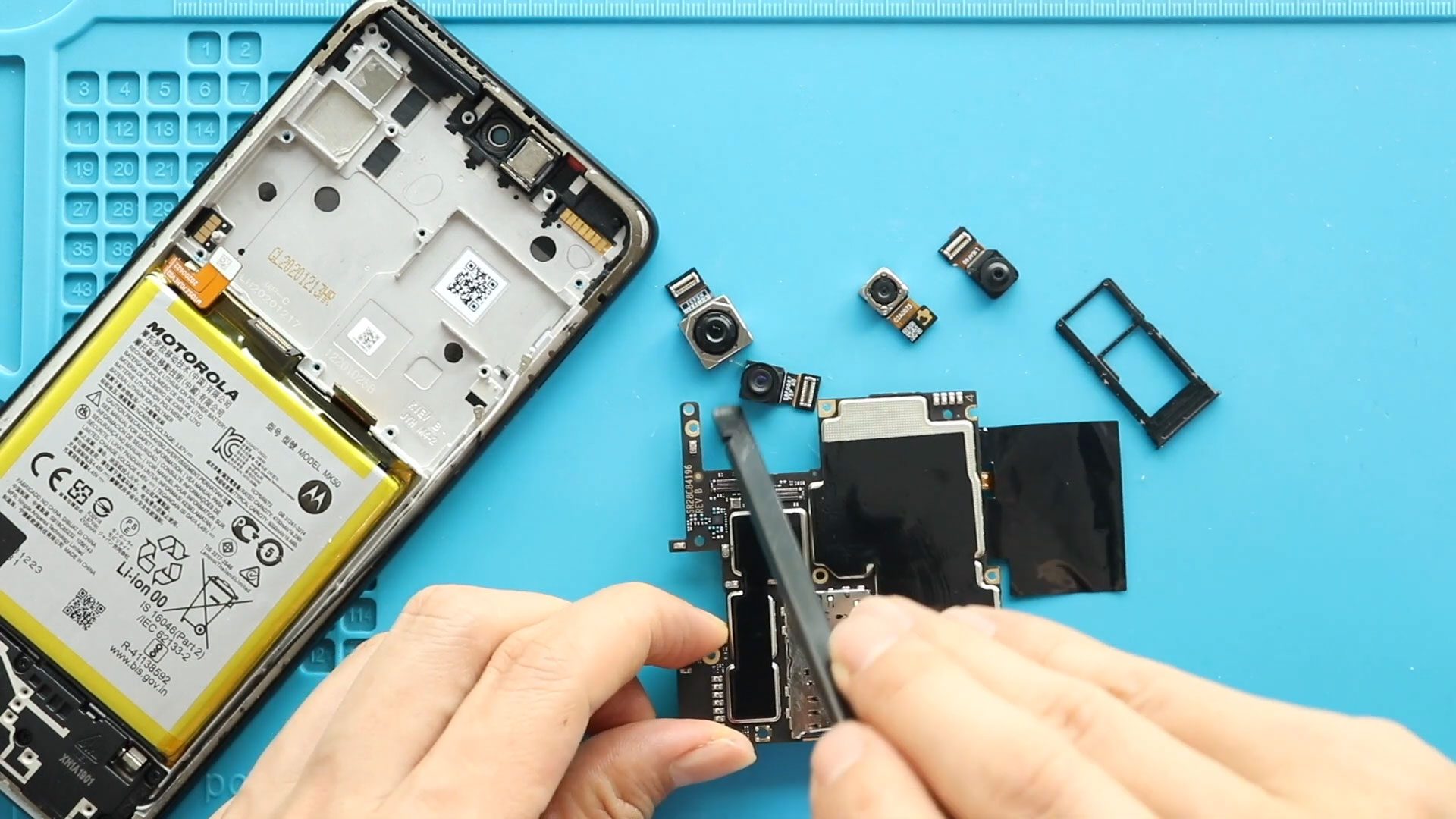
Motorola Moto One 5G ACE Front | Rear Camera Replacement Guide
Welcome back to Geardo. In this repair guide, we will show you how to replace the front and rear cameras on the Motorola Moto One 5G Ace smartphone.
If your camera is blurry, not focusing, showing black screen issues, or failing to open properly, replacing the faulty camera modules can restore photo and video performance. This guide covers the replacement of the front camera, macro camera, wide camera, and ultrawide camera.
This beginner-friendly Google index repair guide includes detailed step-by-step instructions, repair difficulty, required tools, estimated repair time, FAQs, and troubleshooting tips to help you safely complete the repair at home.
Before starting the repair, make sure you have compatible replacement cameras and the proper repair tools.
Repair Information
| Repair Detail | Information |
|---|---|
| Device Type | Smartphone |
| Device Model | Motorola Moto One 5G Ace |
| Repair Type | Front & Rear Camera Replacement |
| Repair Difficulty | ⭐⭐⭐⭐☆☆ |
| Estimated Repair Time | 60–90 Minutes |
Reasons for Front & Rear Camera Replacement
You may need to replace the Motorola Moto One 5G Ace cameras if you notice any of these issues:
- Camera app crashes or fails to open
- Blurry or unfocused photos
- Black screen when opening the camera
- Rear or front camera not detected
- Camera shaking or focusing problems
- Physical damage to camera modules
- Water or moisture damage affecting cameras
Replacing the damaged cameras can restore image quality, video recording, autofocus, and overall camera functionality.
Check The Latest Motorola Phones are in Clearance “up to 60% off” – https://amzn.to/480ho0w
Before You Begin
Compatibility and Model Numbers
- Motorola Moto One 5G Ace
- Motorola Moto One 5G
Model Numbers | XT2113-2, XT2113-5
Tools Required
- Mobile phone heating pad or hairdryer/heat gun
- Plastic pry tool / card pry
- Suction cups
- Phillips #00/#000 screwdrivers
- Torx T3 / T4 / T5 Screwdriver (Depends on the version)
- Flathead Screwdriver
- Tweezers (for connectors)
- B7000 glue or double-sided adhesive (for back cover)
- Rubber bands or bonding clips to secure the back cover
Using proper tools reduces the risk of damaging the phone.
How to Find Tools and Parts
- Heating pad – https://amzn.to/3H0tHzJ
- Portable Heat Gun – https://amzn.to/4mszih1
- Clamps https://amzn.to/3GYJT4w
- STREBITO 142 Piece Repair Tool Kit https://amzn.to/3UO1jUx
- Glue | Adhesive https://amzn.to/46exVxe
- Compatible Parts –
- Battery – https://amzn.to/4nBrXMC
- Screen – https://amzn.to/46cWGtR
- Other Parts – https://amzn.to/4nFxjqp
- Silicone Work Repair Mat https://amzn.to/45Emz5l
How to Replace Motorola Moto One 5G Ace Front & Rear Cameras
Step 1 – Power Off the Phone
Turn off the Motorola Moto One 5G Ace completely before beginning the repair.
Remove the SIM tray from the device.
Step 2 – Heat the Back Cover
The back cover is secured with adhesive.
Gently heat around the edges of the back cover until the adhesive softens.
You can use a heating pad, heat gun, or hair dryer.
Avoid overheating the phone.
Step 3 – Remove the Back Cover
Use a suction cup to create a small opening between the back cover and frame.
Insert a plastic card pry tool into the gap and carefully cut through the adhesive around the edges.
Apply additional heat if needed.
Step 4 – Disconnect the Fingerprint Sensor
Apply gentle heat around the fingerprint sensor area to soften the glue.
Carefully lift the back cover while guiding the fingerprint sensor through the frame.
Be careful not to damage the fingerprint flex cable.
Step 5 – Remove the Board Frame
Undo the ten screws securing the board frame.
Carefully remove the frame from the phone.
Keep the screws organized for reassembly.
Step 6 – Disconnect the Battery
Lift the graphite tape covering the battery connector.
Use a plastic pry tool to disconnect the battery plug from the motherboard.
This prevents accidental short circuits during the repair.
Step 7 – Remove the Front Camera
Carefully disconnect and remove the faulty front camera from the board.
If the replacement camera does not include copper tape, transfer the copper tape from the old camera to the new unit.
Step 8 – Remove the Macro Camera
Disconnect and remove the damaged macro camera module from the motherboard.
Set it aside safely.
Step 9 – Remove the Logic Board
Disconnect the following components from the logic board:
- Two antenna connectors
- Main ribbon connector
- LCD display connector
Remove the SIM tray.
Undo the two screws securing the logic board.
Using a plastic pry tool, gently lift and remove the logic board from the device.
Step 10 – Remove the Wide & Ultrawide Cameras
Disconnect and remove the damaged wide and ultrawide camera modules from the logic board.
Take care not to damage nearby components.
Step 11 – Install the New Wide & Ultrawide Cameras
Place the new wide and ultrawide cameras onto the logic board.
If the replacement units do not include copper tape, transfer the copper tape from the original cameras.
Ensure both cameras are correctly aligned and connected.
Step 12 – Reinstall the Logic Board
Carefully place the logic board back into the phone.
Secure the board using the two screws.
Insert the SIM tray.
Reconnect:
- Two antenna connectors
- Main ribbon connector
- LCD display connector
Ensure all connections are firmly secured.
Step 13 – Install the Macro & Front Cameras
Install the new macro camera onto the motherboard.
Next, install the new front camera with the copper tape attached.
Ensure both camera connectors are properly seated.
Step 14 – Reconnect the Battery
Reconnect the battery plug to the motherboard.
Press the connector gently into place.
Step 15 – Reinstall the Board Frame
Place the board frame back onto the phone.
Reinstall and tighten all ten screws securely.
Ensure the fingerprint sensor is correctly positioned.
Step 16 – Reattach the Back Cover
Before reinstalling the back cover, check the adhesive around the edges.
If needed, apply B7000 glue or install new double-sided adhesive tape.
Press the back cover firmly into place.
Use bonding clips or rubber bands to hold the cover tightly while the adhesive cures.
Leave the device secured for some time for the best seal.
Frequently Asked Questions (FAQ)
Why is my Motorola Moto One 5G Ace camera not working?
The camera module may be damaged, disconnected, or affected by software or hardware issues.
Can I replace only one camera module?
Yes. You can replace individual camera modules such as the front camera, macro camera, wide camera, or ultrawide camera separately.
Is this repair difficult?
This repair has medium-to-high difficulty because it requires motherboard removal and handling multiple delicate connectors.
What is the copper tape used for?
Copper tape helps with heat dissipation and shielding. If your replacement camera does not include it, transfer it from the original camera.
Will replacing the cameras restore photo quality?
Yes. Replacing damaged camera modules can restore autofocus, image clarity, and normal camera performance.
Troubleshooting After Camera Replacement
Camera app still crashes after replacement
Restart the device and check whether all camera connectors are fully secured to the motherboard.
Rear camera is blurry after installation
Check for protective plastic film on the new camera module and clean the lens carefully.
Front camera is not detected
Reconnect the front camera flex cable and ensure it is properly aligned.
Phone does not power on after repair
Check the battery connector and all motherboard connections before reassembling the phone completely.
No signal or network issues after repair
Ensure both antenna connectors are properly connected to the logic board.
Final Words
The Motorola Moto One 5G Ace front and rear camera replacement is a useful repair that can restore your phone’s camera performance and improve photo quality.
By carefully following this beginner-friendly repair guide, you can safely replace the camera modules at home using proper repair tools and patience.
Take extra care while handling the logic board, antenna connectors, and camera flex cables to avoid accidental damage.
If you found this repair guide helpful, feel free to share it and let us know if you have any questions about the repair process.
Related Guides


-
 01Samsung Galaxy A16 5G Battery Replacement | Full DIY Repair Guide
 -
02Samsung Galaxy A16 5G Screen Replacement | Step-by-Step Guide
-
03Google Pixel 6 Power Button Replacement Guide | Volume Button Flex Repair Guide- DIY Repair
-
04Samsung Galaxy A16 5G Back Cover & Camera Lens Frame Replacement Guide | DIY Repair
-
05Why a Heating Pad Is Essential for Mobile Phone Repairs (And How to Use it)
-
06How to Use a Heat Gun or Hair Dryer for Phone/Tablet Repairs
-
07Essential Repair Tools for Phone, Tablet & Laptop Repairs


