Now Reading: OnePlus 8T Ringer Speaker Replacement Guide | DIY Repair
-
01
OnePlus 8T Ringer Speaker Replacement Guide | DIY Repair
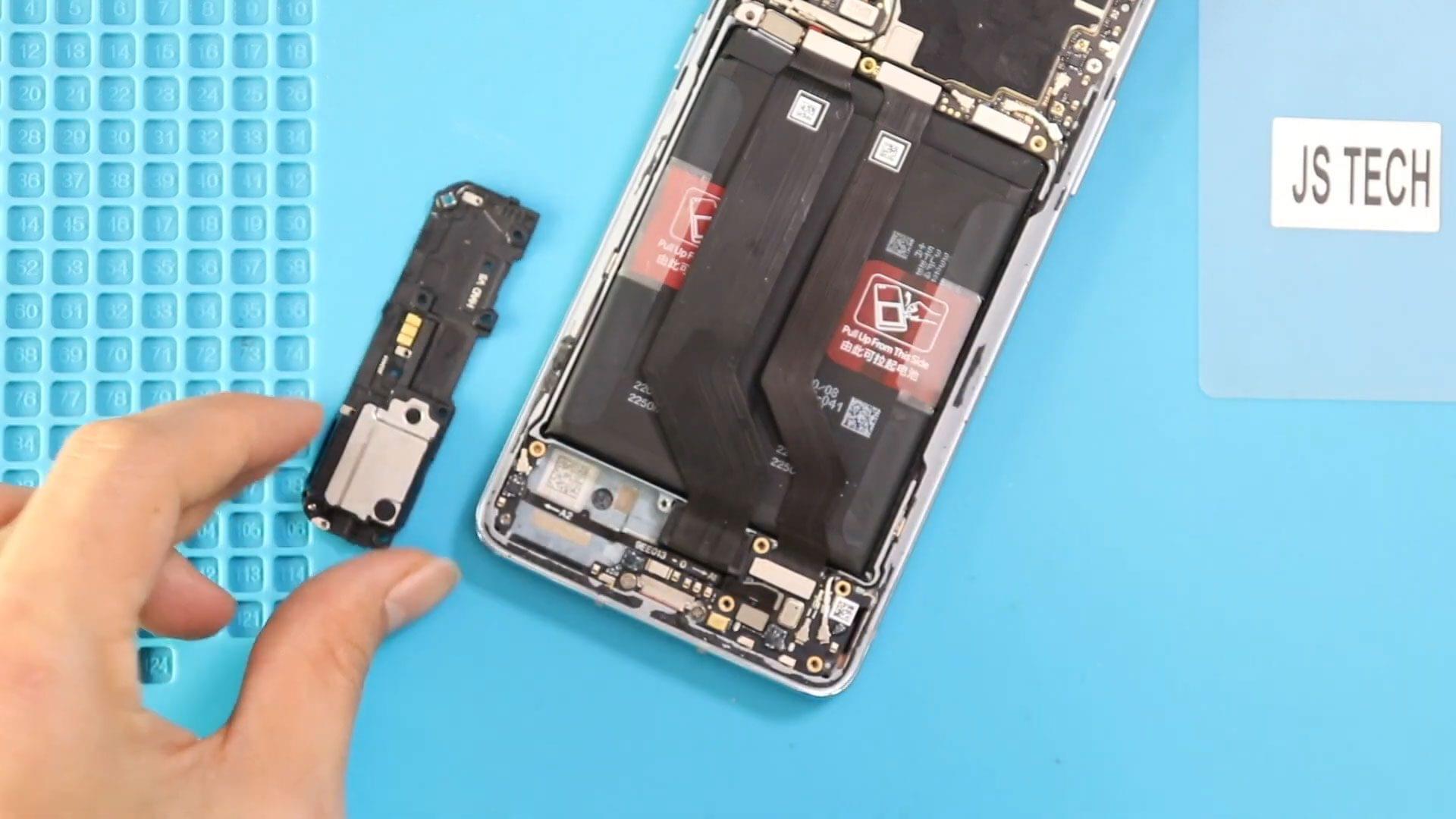
OnePlus 8T Ringer Speaker Replacement Guide | DIY Repair
If your OnePlus 8T is experiencing distorted, low, or non-working ringer sound, replacing the ringer speaker is often the solution. This guide walks you through the full ringer speaker replacement process—covering opening the device, removing the old speaker, installing the new one, and safely reassembling the phone. Following this tutorial restores your phone’s call and notification sound to full quality.
Repair Overview
Device Type: Smartphone
Repair Type: Internal Battery Replacement
Repair Difficulty : ★★★★☆☆☆☆☆☆ (4/10 – Moderate)
Estimated Time: 30–50 minutes
Reasons for Replacing the Ringer Speaker
- Phone ringer is low or muffled
- No sound during incoming calls
- Distorted or crackling audio
- Water or physical damage to the speaker
- Dust or debris causing interference
- Faulty speaker connector
Replacing the ringer speaker is more cost-effective than replacing the whole motherboard or phone, and it often restores full sound functionality.
Before You Begin
Compatibility and Model Numbers
- Oneplus 8T
- Oneplus 8T+ 5G
This repair guide based on OnePlus 8T
Model Numbers | KB2001, KB2000, KB2003, KB2005, KB2007
Tools Required
- Mobile phone heating pad or hairdryer/heat gun
- Plastic pry tool / card pry
- Suction cups
- Phillips #00/#000 screwdrivers
- Torx T3 / T4 Screwdriver
- Flathead Screwdriver
- Tweezers (for connectors)
- B7000 glue or double-sided adhesive (for back cover)
- Rubber bands or bonding clips to secure the back cover
Using proper tools reduces the risk of damaging the phone.
How to Find Tools and Parts
- Heating pad – https://amzn.to/3H0tHzJ
- Portable Heat Gun – https://amzn.to/4mszih1
- Clamps https://amzn.to/3GYJT4w
- STREBITO 142 Piece Repair Tool Kit https://amzn.to/3UO1jUx
- Glue | Adhesive https://amzn.to/46exVxe
- Compatible Parts –
- Battery – https://amzn.to/3IgZ75c
- Screen – https://amzn.to/46iYhNy
- Other Parts – https://amzn.to/47Hh2N3
- Silicone Work Repair Mat https://amzn.to/45Emz5l
Protect Your Oneplus 8T
Protector For The Screen https://amzn.to/4nXZi55
Best Rated Case https://amzn.to/46acCf2
Step-by-Step OnePlus 8T Ringer Speaker Replacement Guide
Before You Start
Ensure you have all necessary tools before starting the repair. Proper tools prevent damage and make the replacement smoother.
Turn off the phone completely and remove the SIM tray before beginning disassembly.
Step 1 – Remove the Back Cover
The back cover of the OnePlus 8T is secured with adhesive:
- Heat the edges gently using a heating pad, heat gun, or hair dryer until the adhesive softens.
- Use a suction cup to lift the back cover slightly.
- Insert a plastic pry tool or card around the edges to cut the adhesive and carefully remove the cover.
Place the back cover aside safely.
Step 2 – Remove the Logic Board Frame
Inside the phone:
- Unscrew the screws securing the logic board frame.
- Use a pry tool to lift the frame carefully.
This exposes the internal components and provides access to the ringer speaker area.
Step 3 – Remove the Faulty Ringer Speaker
Locate the non-working ringer speaker:
- Carefully disconnect any connector plugs if present.
- Lift the old speaker out of its housing.
Inspect the surrounding area for dust or debris before installing the new part.
Step 4 – Install the New Ringer Speaker
- Place the new ringer speaker in the same position as the original.
- Ensure it sits flush and secure any connectors.
- Test lightly (if possible) before full reassembly.
Step 5 – Reassemble the Logic Board Frame
- Carefully place the logic board frame back over the components.
- Secure all screws to lock the frame in place.
Make sure all connectors and plugs are reconnected correctly.
Step 6 – Reinstall the Back Cover
Before placing the back cover:
- Ensure there is sufficient adhesive along the edges.
- If needed, use B7000 glue or a new double-sided adhesive.
Place the back cover and press gently around all edges to secure it.
- Use binding clips or rubber bands to hold the cover in place while the adhesive cures.
- Leave for 30–60 minutes to ensure a proper seal.
Finally, reinsert the SIM tray and power on the device to test the new speaker.
Frequently Asked Questions (FAQ)
Q1: Do I need to remove the motherboard to replace the speaker?
Yes, the logic board frame must be removed to access the ringer speaker safely.
Q2: Can the replacement speaker be damaged during installation?
Yes. Handle the speaker gently and ensure connectors are aligned properly.
Q3: Will replacing the speaker fix distorted sound?
Yes. A faulty speaker is often the primary cause of distorted, low, or no sound.
Q4: Is it necessary to heat the back cover?
Yes. Heating softens the adhesive, preventing cracking or breaking the cover during removal.
Q5: How long should I keep the binding clips on the back cover?
30–60 minutes is recommended to allow adhesive to cure fully.
Troubleshooting After Speaker Replacement
Q1: Speaker still doesn’t work.
Check the connector and make sure the speaker is seated correctly in its slot.
Q2: Sound is low or muffled.
Ensure no dust or debris is trapped under the speaker and all connectors are secure.
Q3: Phone does not detect the speaker.
Reconnect all flex cables and logic board connections. A loose connector may prevent detection.
Q4: Back cover lifting after repair.
Reapply adhesive or use binding clips for a longer curing period.
Q5: Other internal components not working after repair.
Double-check that all connectors and screws on the logic board frame were replaced properly.
Replacing the ringer speaker on the OnePlus 8T is a moderate-level repair that can restore clear ringtone and notification sounds. With patience, proper tools, and careful handling, you can complete this repair successfully at home.
If you found this guide helpful, feel free to explore more repair tutorials to keep your devices running like new.
Related Guides