
Now Reading: Samsung Galaxy A71 Speaker Replacement Guide | Fix Sound issues
-
01
Samsung Galaxy A71 Speaker Replacement Guide | Fix Sound issues
Samsung Galaxy A71 Speaker Replacement Guide | Fix Sound issues
Hi everyone, welcome back to Geardo.
In today’s guide, we’ll walk you through how to replace the ringer speaker on the Samsung Galaxy A71 4G mobile phone.
If your device has no sound, low volume, or distorted audio when playing music or ringing, the ringer speaker might be faulty. Don’t worry — this repair is fairly straightforward and beginner-friendly if you follow the steps carefully.
🔧 Repair Overview
- Device Type: Smartphone
- Repair Type: Ringer Speaker Replacement
- Repair Difficulty: ⭐⭐☆☆☆ (Easy–Moderate)
- Estimated Time: 20–30 minutes
🔍 Reasons for This Repair
- No sound from speaker
- Low or distorted audio
- Speaker crackling noise
- Ringtone not audible
- Water or dust damage
Before You Begin
Compatibility and Model Numbers
- Samsung Galaxy A71 4G
This repair guide based on Samsung Galaxy A71 4G Model.
Model Numbers | SM-A715F, SM-A715F/DS, SM-A715F/DSN, SM-A715F/DSM, SM-A715W, SM-A715X
Tools Required
- Mobile phone heating pad or hairdryer/heat gun
- Plastic pry tool / card pry
- Suction cups
- Phillips #00/#000 screwdrivers
- Tweezers (for connectors)
- B7000 glue or double-sided adhesive (for back cover)
- Rubber bands or bonding clips to secure the back cover
Using proper tools reduces the risk of damaging the phone.
How to Find Tools and Parts
- Heating pad – https://amzn.to/3H0tHzJ
- Portable Heat Gun – https://amzn.to/4mszih1
- Clamps https://amzn.to/3GYJT4w
- STREBITO 142 Piece Repair Tool Kit https://amzn.to/3UO1jUx
- Glue | Adhesive https://amzn.to/46exVxe
- Compatible Parts –
- Battery – https://amzn.to/4ogQEhS
- Screen – https://amzn.to/43nafEZ
- Other Parts – https://amzn.to/4oqla9h
- Silicone Work Repair Mat https://amzn.to/45Emz5l
Protect Your Galaxy A71
- Best Rated Case https://amzn.to/3WDBTd9
- Screen Protector https://amzn.to/42IPsvz
🔊 Step-by-Step Ringer Speaker Replacement Guide
Step 1: Heat the Back Cover
Start by gently warming the edges of the back cover to loosen the adhesive. You can use a heating pad, heat gun, or even a hairdryer.
Step 2: Create an Opening
Use a suction cup to slightly lift the back cover and create a small gap between the frame and the panel.
Step 3: Remove the Back Cover
Insert a plastic card or pry tool into the gap and carefully slide it around the edges to cut through the adhesive. Slowly lift off the back cover.
Step 4: Remove SIM Tray
Eject the SIM tray to avoid any obstruction during disassembly.
Step 5: Unscrew the Mid-Frame
Remove all the screws securing the mid-frame.
Step 6: Detach the Mid-Frame
Use a plastic pry tool to gently release the clips and separate the mid-frame from the device.
Step 7: Disconnect Battery
Carefully disconnect the battery connector before working on internal components.
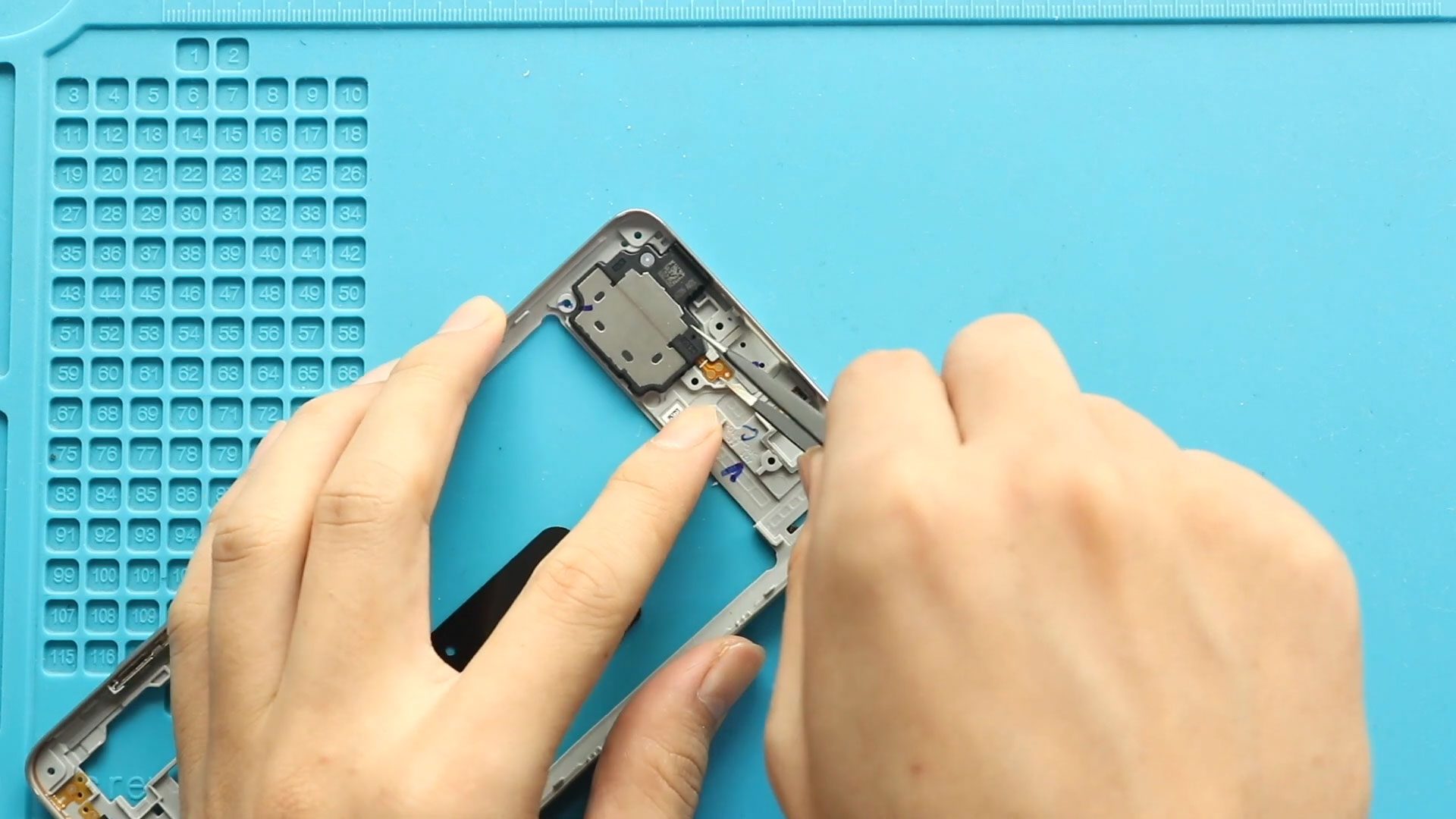
Step 8: Remove Faulty Ringer Speaker
Locate the ringer speaker module at the bottom of the phone and gently lift it out using a pry tool.
Step 9: Install New Speaker
Place the new ringer speaker into position, ensuring it sits properly in its housing.
Step 10: Reconnect Components
Reconnect the battery connector and make sure everything is properly aligned.
Step 11: Reassemble Mid-Frame
Place the mid-frame back, secure the clips, and tighten all screws.
Step 12: Prepare Back Cover
Before closing, check if the back cover adhesive is still usable. If not, apply new adhesive like B7000 or double-sided tape.
Step 13: Final Assembly
Attach the back cover and apply pressure using clips or rubber bands. Leave it for some time to ensure a strong bond.
❓ FAQ (Frequently Asked Questions)
Q1: Why is my Galaxy A71 speaker not working?
It could be due to a damaged ringer speaker, dust buildup, or internal connection issues.
Q2: Is this repair easy for beginners?
Yes, it’s one of the simpler repairs with minimal risk.
Q3: Do I need to replace the whole module?
Yes, the ringer speaker is replaced as a complete unit.
Q4: Can cleaning fix the speaker?
Sometimes, but if the issue persists, replacement is the best option.
Q5: Will this fix low volume issues?
Yes, if the speaker itself is faulty.
🔧 Troubleshooting (After The Repair)
Q1: No sound after replacement?
Check if the speaker is properly seated and the battery connector is secure.
Q2: Sound still distorted?
Try another replacement speaker — the new one may be defective.
Q3: Phone not powering on?
Ensure the battery connector is properly connected.
Q4: Back cover not sticking?
Apply fresh adhesive and use pressure for longer.
Q5: Sound cuts in and out?
Check for loose connections or debris in the speaker housing.
✅ Final Thoughts
Replacing the ringer speaker on the Samsung Galaxy A71 4G is a quick and effective fix for sound-related issues. With basic tools and a bit of patience, even beginners can complete this repair successfully.
If you have any questions, feel free to ask.
Related Guides
Galaxy A71 5g Battery is Draining Fast


-
 01Samsung Galaxy A16 5G Battery Replacement | Full DIY Repair Guide
 -
02Samsung Galaxy A16 5G Screen Replacement | Step-by-Step Guide
-
03Google Pixel 6 Power Button Replacement Guide | Volume Button Flex Repair Guide- DIY Repair
-
04Samsung Galaxy A16 5G Back Cover & Camera Lens Frame Replacement Guide | DIY Repair
-
05Why a Heating Pad Is Essential for Mobile Phone Repairs (And How to Use it)
-
06How to Use a Heat Gun or Hair Dryer for Phone/Tablet Repairs
-
07Essential Repair Tools for Phone, Tablet & Laptop Repairs


