
Now Reading: Samsung Galaxy Tab A8 10.5″ Top Ringer Speaker Replacement Guide | (2021) X200 X205
-
01
Samsung Galaxy Tab A8 10.5″ Top Ringer Speaker Replacement Guide | (2021) X200 X205
Samsung Galaxy Tab A8 10.5″ Top Ringer Speaker Replacement Guide | (2021) X200 X205
The top ringer speaker on the Samsung Galaxy Tab A8 10.5 (2021) is responsible for alert sounds, ringtones, notifications, system sounds, and audio during certain apps. If this speaker becomes faulty, you may experience low sound, crackling noise, distorted audio, or no sound at all even when the volume is turned up.
Speaker failure is commonly caused by liquid exposure, dust buildup, physical impact, or normal wear over time. If headphones work fine but the tablet produces no alert sounds, replacing the top ringer speaker module is the correct solution.
In this Geardo DIY repair guide, you’ll learn how to safely replace the top ringer speaker on Samsung Galaxy Tab A8 10.5 X200 and X205 models. This repair does not require soldering but does require careful LCD removal and connector handling.
Repair Difficulty
Difficulty Rating: ⭐⭐⭐⭐☆ (4 out of 5)
Estimated Time: 45–60 minutes
Repair Type: Top Ringer Speaker Replacement
Skill Level: Intermediate
⚠️ LCD removal is required. Work slowly and apply even heat to avoid cracking the screen.
Common Signs of a Faulty Top Ringer Speaker
- No ringtone or notification sounds
- Very low or muffled audio
- Crackling or distorted sound
- Sound works only with headphones
- System sounds missing
Before You Begin
Compatibility and Model Numbers
This repair guide based on Samsung Galaxy Tab A8 10.5-inch 2021 X205 Model.
Also Compatible with Both Wifi and Cellular Edition models.
Model Numbers | SM-X200, SM-X205, SM-X207
Required Tools
- Heating pad / heat gun / hairdryer
- Suction cup
- Plastic card pry tools / opening picks/ Tweezers
- Phillips screwdriver #00 / #000
- Adhesive (B7000 or double-sided back cover adhesive)
- Bonding clips or rubber bands (optional but recommended)
Make sure the tablet is turned off and the SIM tray is removed (For Cellular Version)before starting.
How to Find Tools and Parts
- Heating pad – https://amzn.to/3H0tHzJ
- Portable Heat Gun – https://amzn.to/4mszih1
- Clamps https://amzn.to/3GYJT4w
- STREBITO 142 Piece Repair Tool Kit https://amzn.to/3UO1jUx
- Glue | Adhesive https://amzn.to/46exVxe
- Compatible Parts –
- Battery – https://amzn.to/4fC8rNj
- Touch Screen – https://amzn.to/416eZxY
- Other Parts – https://amzn.to/45jcN8G
- Silicone Work Repair Mat https://amzn.to/45Emz5l
Protect Your Galaxy Tab A8 10.5 2021
- Screen Protector Glass For The Screen https://amzn.to/4mMju9g
- Best Cases For Your Galaxy Tab https://amzn.to/4mdkovq
Step-by-Step Samsung Galaxy Tab A8 Top Ringer Speaker Replacement
Step 1: Power Off the Tablet
Turn off the Samsung Galaxy Tab A8 completely before starting the repair.
Step 2: Open the Tablet
- Apply gentle heat around the LCD screen edges to soften the adhesive
- Place the tablet screen-side down on a heating pad and select the tablet heating option
- Alternatively, use a heat gun or hairdryer evenly around the edges
Step 3: Remove the LCD Screen
- Use a suction cup to create a small opening between the screen and frame
- Insert a plastic pry tool or card
- Carefully cut the adhesive around all edges
- Gently lift the LCD and slide it downward to rest on the body
Step 4: Disconnect Battery & LCD Connectors
- Disconnect the battery connector first to prevent short circuits
- Disconnect the LCD display connector
- Carefully remove the LCD screen assembly and place it aside
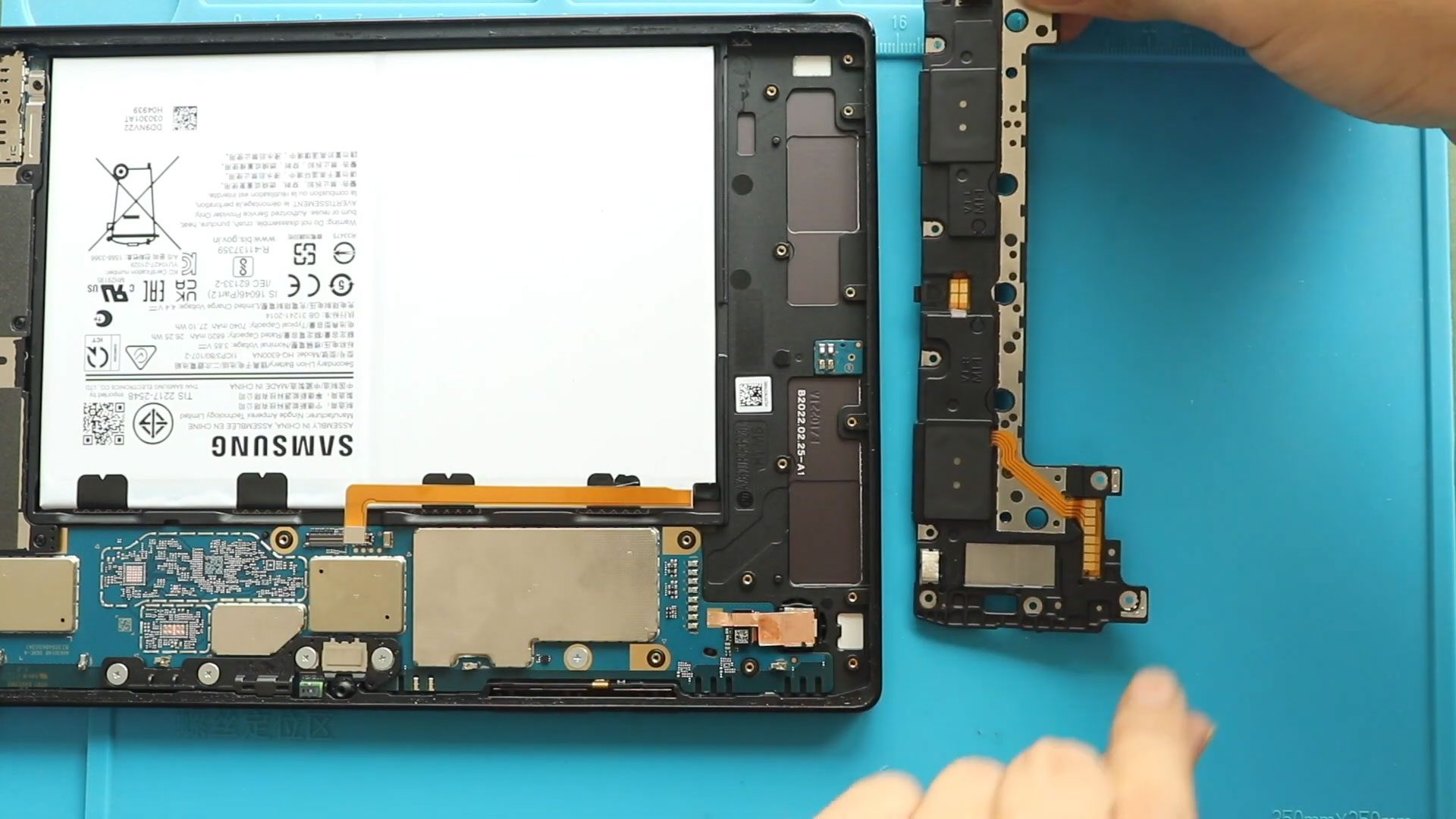
Step 5: Remove the Faulty Top Ringer Speaker
- Locate the top ringer speaker module inside the tablet
- Lift the speaker gently from its housing
- Disconnect or remove the faulty speaker carefully
Step 6: Install the New Top Ringer Speaker
- Place the new top ringer speaker into the same position
- Ensure proper alignment with the speaker cavity
- Make sure it sits flat and secure
Step 7: Reconnect LCD & Battery Connectors
- Reconnect the LCD connector
- Reconnect the battery connector
- Double-check all connections
Step 8: Test the Speaker
Before sealing the tablet:
- Power on the device
- Increase volume
- Test ringtones, notifications, and system sounds
- Confirm the top ringer speaker is working correctly
Step 9: Reinstall the LCD Screen
- Apply B7000 glue or double-sided LCD adhesive around the frame
- Align the screen from the bottom first
- Press gently along all edges
Step 10: Final Closing
- Use bonding clips or rubber bands to hold the screen in place
- Leave the tablet undisturbed for 30–60 minutes to allow adhesive to cure
Frequently Asked Questions (FAQ)
Is the top ringer speaker a separate replaceable part?
Yes, it is a modular component and can be replaced independently.
Will replacing the speaker erase my data?
No, this repair does not affect internal storage or data.
Is soldering required?
No soldering is required for this repair.
What adhesive should I use to reseal the screen?
B7000 glue or pre-cut double-sided LCD adhesive is recommended.
How long should I wait before using the tablet?
Wait at least 1 hour before normal use.
Troubleshooting (After The Repair)
Q: The top ringer speaker still has no sound after replacement. What should I check?
A: Ensure the speaker is seated correctly and that the battery and LCD connectors are firmly connected.
Q: Sound is very low even with a new speaker.
A: Check the speaker cavity for dust or debris and clean it before installation.
Q: Sound works with headphones but not from the speaker.
A: Recheck the speaker placement and confirm you replaced the correct top ringer module.
Q: Tablet does not power on after reassembly.
A: Verify that the battery connector is properly connected.
Final Thoughts
Replacing the top ringer speaker on the Samsung Galaxy Tab A8 10.5 (X200 / X205) is an effective way to restore clear notification and system sounds. With careful handling and proper testing, this repair can be successfully completed at home.
For more tablet repair tutorials and guides, visit DIYGeardo.
Related Guides


-
 01Samsung Galaxy A16 5G Battery Replacement | Full DIY Repair Guide
 -
02Samsung Galaxy A16 5G Screen Replacement | Step-by-Step Guide
-
03Google Pixel 6 Power Button Replacement Guide | Volume Button Flex Repair Guide- DIY Repair
-
04Samsung Galaxy A16 5G Back Cover & Camera Lens Frame Replacement Guide | DIY Repair
-
05Why a Heating Pad Is Essential for Mobile Phone Repairs (And How to Use it)
-
06How to Use a Heat Gun or Hair Dryer for Phone/Tablet Repairs
-
07Essential Repair Tools for Phone, Tablet & Laptop Repairs


