
Now Reading: Motorola Moto G Stylus 2021 XT2115 Back Cover & Camera Lens Frame Replacement Guide | DIY Repair
-
01
Motorola Moto G Stylus 2021 XT2115 Back Cover & Camera Lens Frame Replacement Guide | DIY Repair
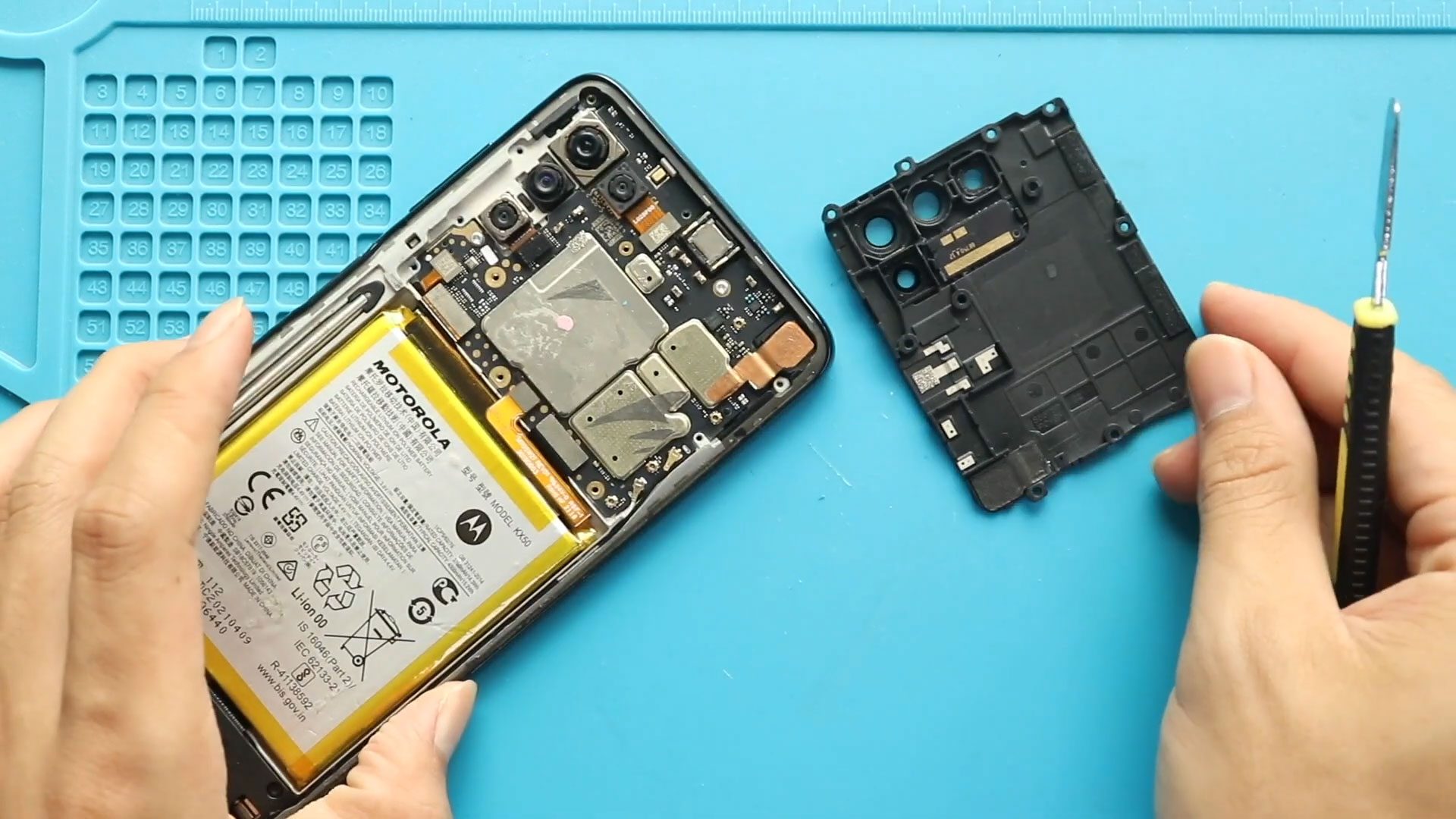
Motorola Moto G Stylus 2021 XT2115 Back Cover & Camera Lens Frame Replacement Guide | DIY Repair
Hi everyone, Welcome back to Geardo 👋
Today, we will show you how to replace the camera lens glass on the Motorola Moto G Stylus (2021). If your camera glass is scratched, cracked, or affecting photo quality, this guide will help you fix it easily at home.
This is a beginner-friendly step-by-step guide, so even if you’re new to phone repairs, you can follow along with confidence.
🔧 Repair Overview
Device Type: Smartphone
Repair Type: Camera Lens Glass Replacement
Repair Difficulty: ⭐⭐⭐☆☆ (3/5 – Moderate)
⏱ Estimated Time: 30–50 minutes
Reasons for Camera Lens Glass Replacement
- Cracked or shattered camera lens glass
- Scratches causing blurry photos
- Dust entering the camera module
- Reduced image clarity or glare in pictures
- Cosmetic damage affecting resale value
Before You Begin
Compatibility and Model Numbers
- Motorola Moto G Stylus (2021)
Model Numbers | XT2115, XT2115-1
Tools Required
- Mobile phone heating pad or hairdryer/heat gun
- Plastic pry tool / card pry
- Suction cups
- Phillips #00/#000 screwdrivers
- Torx T3 / T4 / T5 Screwdriver (Depends on the version)
- Flathead Screwdriver
- Tweezers (for connectors)
- B7000 glue or double-sided adhesive (for back cover)
- Rubber bands or bonding clips to secure the back cover
Using proper tools reduces the risk of damaging the phone.
🔧 Step-by-Step Camera Lens Glass Replacement
Step 1: Heat the Back Cover
Gently heat around the edges of the back cover to soften the adhesive.
- Use a heating pad (recommended)
- Or a heat gun / hairdryer
Step 2: Create an Opening
- Use a suction cup to lift slightly
- Insert a plastic pry tool or card
- Slide around edges to cut adhesive carefully
Step 3: Remove the Back Cover
Once adhesive is loosened, gently remove the back cover from the phone.
Step 4: Remove Screws & Frame
- Unscrew 11 screws
- Remove the logic board frame with the lens module
Step 5: Remove Broken Camera Lens Glass
- Apply gentle heat to the lens area
- Push the lens from the rear side
⚠️ If the glass is shattered:
Carefully remove small pieces one by one to avoid damage
Step 6: Clean the Surface
- Remove leftover adhesive
- Clean dust and glass particles completely
Step 7: Install New Lens Glass
- Place the new lens glass properly
- Secure it using adhesive
Step 8: Reassemble the Device
- Place the frame back
- Tighten all 11 screws securely
Step 9: Prepare Back Cover
Before reinstalling:
- Check if adhesive is still usable
- If not, apply B7000 glue or new adhesive
Step 10: Seal the Back Cover
- Attach the back cover
- Use bonding clips or rubber bands
- Leave it for some time for proper sealing
Frequently Asked Questions (FAQ)
Q1: Can I replace only the lens glass without replacing the camera?
Yes, the lens glass is separate from the camera module and can be replaced individually.
Q2: Will this repair improve camera quality?
Yes, if scratches or cracks were affecting your photos, replacing the glass will restore clarity.
Q3: Is heat necessary for this repair?
Yes, heat softens adhesive, making removal safe and easier.
Q4: What if glass pieces fall inside the phone?
Clean thoroughly before reassembly to avoid internal damage.
Q5: Can I reuse the old adhesive?
It’s not recommended. Use fresh adhesive for best results.
🛠 Troubleshooting
Q1: Camera is blurry after replacement?
Ensure the lens glass is clean and properly aligned.
Q2: Dust inside camera after repair?
Open again and clean using a microfiber cloth or air blower.
Q3: Back cover not sticking properly?
Apply new adhesive or B7000 glue and press firmly.
Q4: Lens not fitting correctly?
Check if leftover adhesive or glass debris is blocking proper placement.
Q5: Camera not working after repair?
Ensure no internal connectors were disturbed during the process.
Related Guides


-
 01Samsung Galaxy A16 5G Battery Replacement | Full DIY Repair Guide
 -
02Samsung Galaxy A16 5G Screen Replacement | Step-by-Step Guide
-
03Google Pixel 6 Power Button Replacement Guide | Volume Button Flex Repair Guide- DIY Repair
-
04Samsung Galaxy A16 5G Back Cover & Camera Lens Frame Replacement Guide | DIY Repair
-
05Why a Heating Pad Is Essential for Mobile Phone Repairs (And How to Use it)
-
06How to Use a Heat Gun or Hair Dryer for Phone/Tablet Repairs
-
07Essential Repair Tools for Phone, Tablet & Laptop Repairs


