
Now Reading: Samsung Galaxy Tab A7 Lite Speaker & Vibrator Motor Replacement Guide – T220/T225/T227
-
01
Samsung Galaxy Tab A7 Lite Speaker & Vibrator Motor Replacement Guide – T220/T225/T227
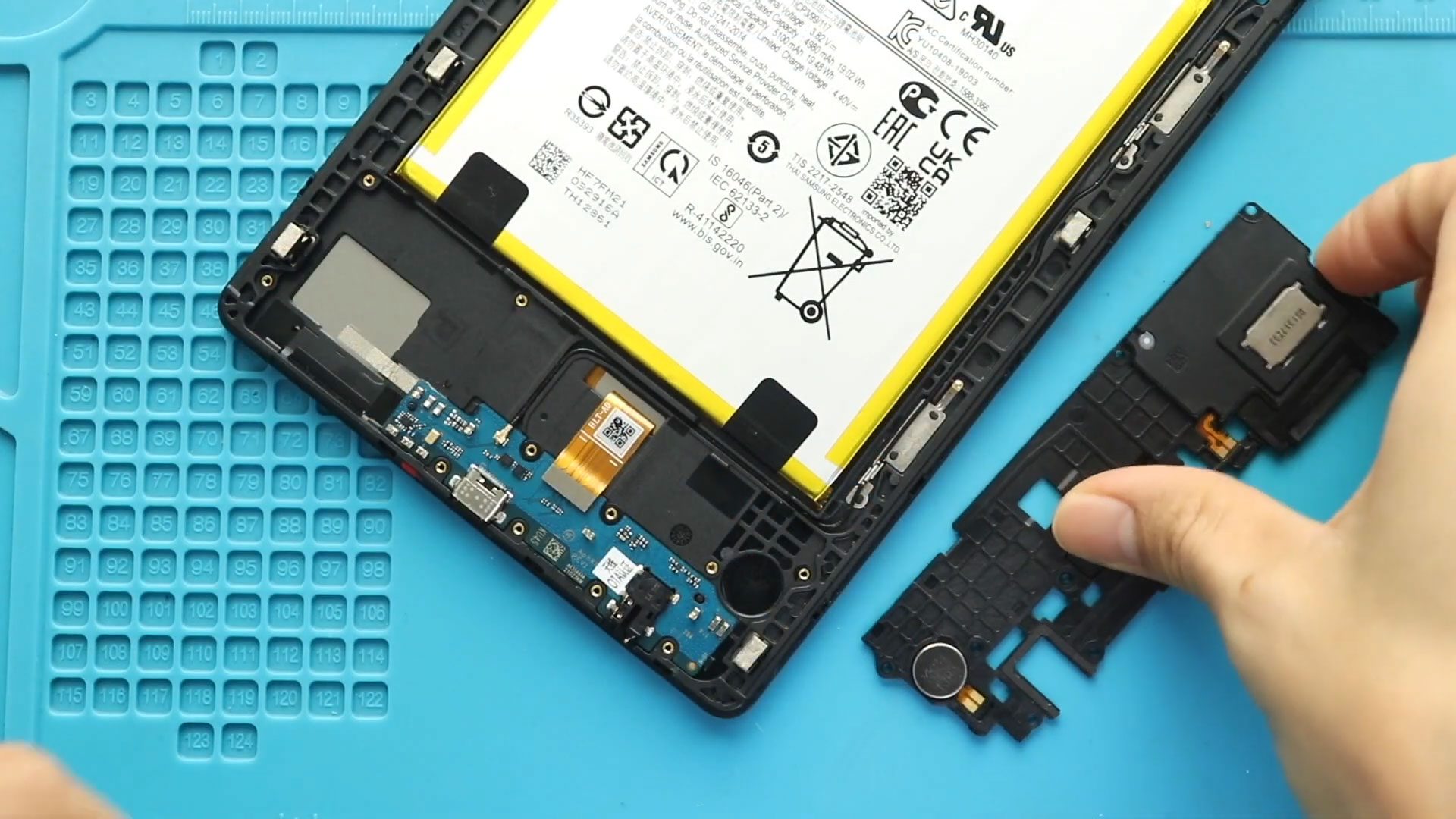
Samsung Galaxy Tab A7 Lite Speaker & Vibrator Motor Replacement Guide – T220/T225/T227
If your Samsung Galaxy Tab A7 Lite has no sound, distorted ringer audio, weak speaker output, or no vibration, the loudspeaker or vibrator motor may be faulty. In this guide, we’ll show you how to replace the ringer loudspeaker and vibrator motor on Samsung Galaxy Tab A7 Lite models T220 and T225.
This repair is straightforward and suitable for beginners with basic tools.
Repair Difficulty
Difficulty Level: 🟢 Easy – Moderate
Estimated Time: 20–30 minutes
Repair Type: Loud speaker & vibrator motor replacement
No soldering is required, and all parts are modular.
Common Reasons for Speaker & Vibrator Replacement
- No ringer sound or very low volume
- Distorted or crackling speaker audio
- Media sound works only with headphones
- No vibration for calls or notifications
- Vibrator not working after drop or water damage
- Dust or moisture affecting speaker performance
If these issues persist after software checks, hardware replacement is recommended.
Before You Begin
Compatibility and Model Numbers
This repair guide based on Samsung Galaxy Tab A7 Lite 8.7-inch 2021 T225 Model.
Also Compatible with Both Wifi and Cellular Edition models.
Model Numbers | SM-T220, SM-T225, SM-T227
Required Tools
- Heating pad / heat gun / hairdryer
- Suction cup
- Plastic card pry tools / opening picks/ Tweezers
- Phillips screwdriver #00 / #000
- Adhesive (B7000 or double-sided back cover adhesive)
- Bonding clips or rubber bands (optional but recommended)
Make sure the tablet is turned off and the SIM tray is removed (For Cellular Version)before starting.
How to Find Tools and Parts
- Heating pad – https://amzn.to/3H0tHzJ
- Portable Heat Gun – https://amzn.to/4mszih1
- Clamps https://amzn.to/3GYJT4w
- STREBITO 142 Piece Repair Tool Kit https://amzn.to/3UO1jUx
- Glue | Adhesive https://amzn.to/46exVxe
- Compatible Parts –
- Battery – https://amzn.to/4oEg2is
- Screen – https://amzn.to/3Hd4vWQ
- Other Parts – https://amzn.to/45lxK2U
- Silicone Work Repair Mat https://amzn.to/45Emz5l
Step-by-Step Loud Speaker & Vibrator Replacement Guide
Step 1: Power Off and Remove SIM Tray
Turn off the tablet completely. Remove the SIM tray using a SIM ejector tool.
Step 2: Remove the Back Cover
Create a small gap near the charging port or SIM tray using a plastic pick or card pry tool.
Carefully slide the tool around the edges to release the plastic clips. Work slowly to avoid cracking the back cover.
Once all clips are released, lift and remove the back cover.
Step 3: Remove Top Speaker Bracket & Disconnect Battery
Locate the top speaker bracket covering the battery connector.
Remove the screws securing the bracket and lift it away.
Disconnect the battery plug using a plastic pry tool to prevent short circuits.
Step 4: Remove the Bottom Speaker with Cover
Move to the bottom section of the tablet.
Remove the screws securing the bottom speaker cover, then lift out the loudspeaker module along with the cover.
Step 5: Remove the Faulty Vibrator Motor
Locate the vibrator motor near the bottom area.
Carefully lift and remove the faulty vibrator motor from its position.
Step 6: Install the New Vibrator Motor
Place the new vibrator motor into position, ensuring proper alignment and contact with the frame.
Step 7: Reinstall Bottom Speaker with Cover
Place the loudspeaker module back into position with its cover.
Secure it properly using the screws removed earlier.
Step 8: Reconnect Battery & Secure Top Speaker Bracket
Reconnect the battery connector.
Reinstall the top speaker bracket and secure it with screws.
Step 9: Close the Back Cover
Align the back cover from bottom to top and press firmly around the edges until all clips snap into place.
Reinsert the SIM tray.
Final Check
Power on the tablet and test:
- Ringer and media sound
- Vibration for calls and notifications
Confirm everything works correctly before regular use.
Frequently Asked Questions (FAQ)
Q: Can I replace only the speaker or only the vibrator?
A: Yes. The loudspeaker and vibrator motor are separate parts and can be replaced individually.
Q: Will this repair erase my data?
A: No. Replacing the speaker or vibrator does not affect your data.
Q: Do I need to remove the screen for this repair?
A: No. This repair is completed entirely from the back of the tablet.
Q: Is it safe to use aftermarket speaker or vibrator parts?
A: Yes, but sound and vibration strength may vary. Original or high-quality aftermarket parts are recommended.
Troubleshooting (After The Repair)
Q: No sound after speaker replacement.
A: Check that the speaker module is seated correctly and that no dust or debris is blocking the contacts.
Q: Sound is distorted or very low.
A: Ensure the speaker grill is clean and the speaker cover is installed properly. Try adjusting volume settings.
Q: Vibrator still not working.
A: Verify the vibrator motor is correctly positioned and making proper contact. Restart the tablet and test again.
Q: Tablet won’t power on after repair.
A: Reopen the device and confirm the battery connector is fully seated and the bracket is installed correctly.


-
 01Samsung Galaxy A16 5G Battery Replacement | Full DIY Repair Guide
 -
02Samsung Galaxy A16 5G Screen Replacement | Step-by-Step Guide
-
03Google Pixel 6 Power Button Replacement Guide | Volume Button Flex Repair Guide- DIY Repair
-
04Samsung Galaxy A16 5G Back Cover & Camera Lens Frame Replacement Guide | DIY Repair
-
05Why a Heating Pad Is Essential for Mobile Phone Repairs (And How to Use it)
-
06How to Use a Heat Gun or Hair Dryer for Phone/Tablet Repairs
-
07Essential Repair Tools for Phone, Tablet & Laptop Repairs


