
Now Reading: Samsung Galaxy A12 Earpiece Speaker Replacement Guide | Vibrator Motor
-
01
Samsung Galaxy A12 Earpiece Speaker Replacement Guide | Vibrator Motor
Samsung Galaxy A12 Earpiece Speaker Replacement Guide | Vibrator Motor
If your Samsung Galaxy A12 or Galaxy A12 Nacho has low or no sound during calls, or if vibration alerts have stopped working, the earpiece speaker or vibrator motor may be faulty. These components can fail due to drops, dust buildup, moisture exposure, or normal wear over time.
In this guide, we’ll show you how to replace the earpiece speaker and vibrator motor on the Samsung Galaxy A12 and Galaxy A12 Nacho (SM-A125 / SM-A127). Both components are located in the upper section of the phone and can be replaced during the same repair. Since the internal layout is nearly identical on both models, the steps apply to all supported variants.
Compatible Models
This repair guide based on the Samsung Galaxy A12 device, This guide works for the following models:
- Samsung Galaxy A12 (SM-A125)
- Samsung Galaxy A12 Nacho (SM-A127)
- Samsung Galaxy M12
- Samsung Galaxy F12
Compatible Mode Numbers | SM-A125F/DSN, SM-A125F/DS, SM-A125F, SM-A125M, SM-A125U, SM-A125U1, SM-A125N, SM-A125W, SM-A127F/DSN, SM-A127F/DS, SM-A127F, SM-A127M, SM-A127U, SM-F127G, SM-F127G/DS, SM-F127F, SM-F127F/DS, SM-M127F, SM-M127F/DSN, SM-M127N
Reasons to Replace the Earpiece Speaker or Vibrator Motor
You may need this repair if you notice:
- No sound or very low sound during phone calls
- Distorted or crackling audio from the earpiece
- Phone does not vibrate for calls or notifications
- Weak or inconsistent vibration alerts
- Components stopped working after impact or liquid damage
Replacing the faulty part usually restores normal call audio and vibration feedback.
Repair Difficulty
Repair Difficulty: ★★★☆☆ (3/5)
Estimated Time: 30–40 minutes
Repair Type: Earpiece speaker & vibrator motor replacement
Skill Level: Beginner to Intermediate
This repair requires moderate disassembly but no soldering.
Before You Begin
Required Tools
- Heating pad / heat gun / hairdryer
- Suction cup
- Plastic card pry tools / opening picks / Tweezers
- Phillips screwdriver #0 / #00
- Adhesive (B7000 or double-sided back cover adhesive)
- Bonding clips or rubber bands (optional but recommended)
Make sure the device is turned off and the SIM tray is removed before starting.
How to Find Tools and Parts
- Heating pad – https://amzn.to/3H0tHzJ
- Portable Heat Gun – https://amzn.to/4mszih1
- Clamps https://amzn.to/3GYJT4w
- STREBITO 142 Piece Repair Tool Kit https://amzn.to/3UO1jUx
- Glue | Adhesive https://amzn.to/46exVxe
- Compatible Parts –
- Battery – https://amzn.to/4mum1VB
- Screen – https://amzn.to/4mQIxrC
- Other Parts – https://amzn.to/4fPvSmt
- Silicone Work Repair Mat https://amzn.to/45Emz5l
Protect Your Galaxy A12
- Protector For The Screen https://amzn.to/3JvKYBK
- Best Rated Case https://amzn.to/3HJ5Qoq
Samsung Galaxy A12 Earpiece & Vibrator Motor Replacement – Step-by-Step
Step 1: Power Off and Open the Phone
Turn off the phone completely. Remove the SIM tray using a SIM eject tool.
Step 2: Remove the Back Cover
Create a gap near the SIM slot or charging port using a card pry tool.
Slide the tool around the edges to release the plastic clips.
Important:
The fingerprint sensor is attached to the back cover—lift gently.
Step 3: Remove the Board Frame
Unscrew and remove the board frame to access the upper components.
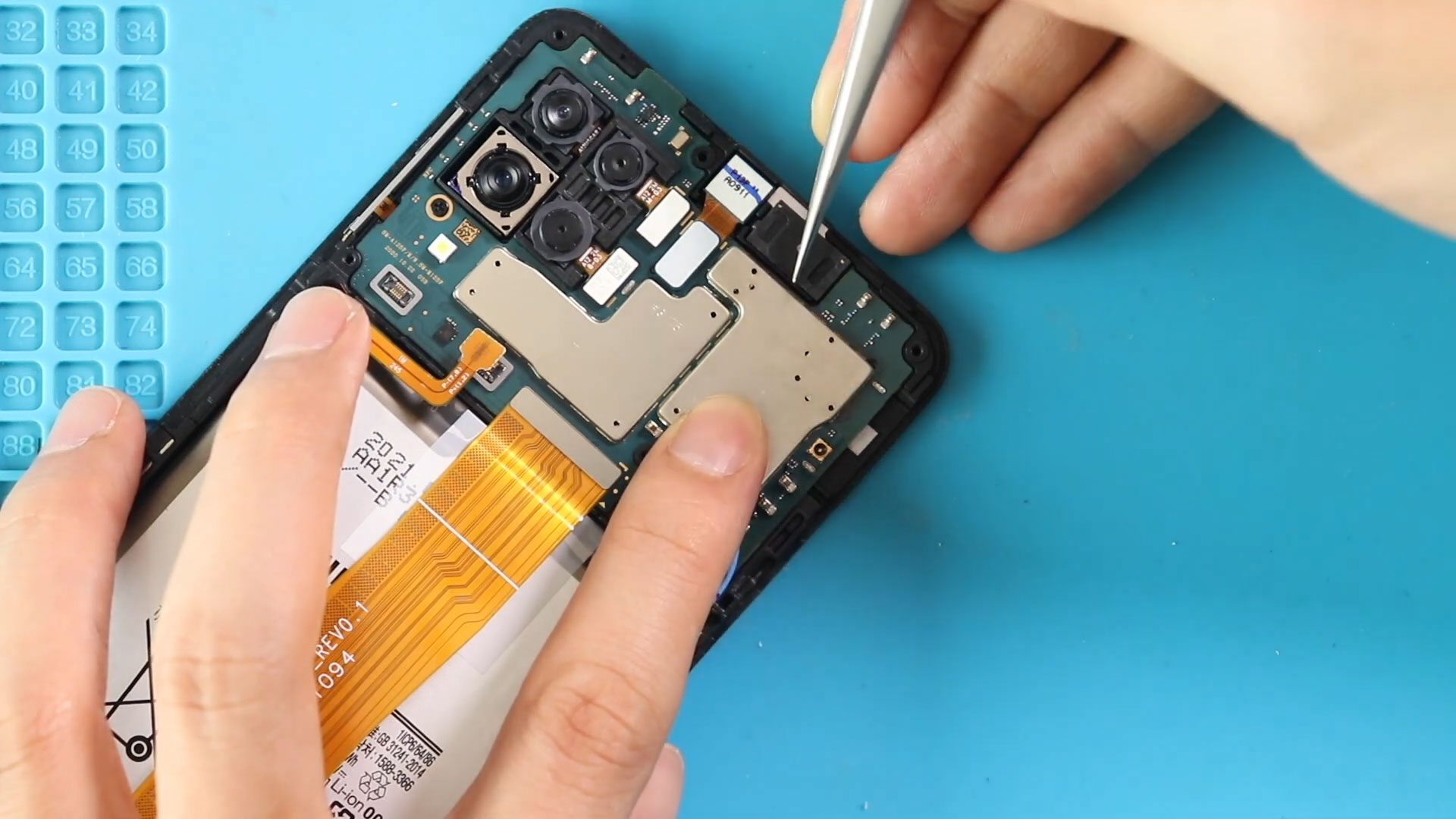
Step 4: Remove the Faulty Earpiece Speaker
Lift and remove the non-working earpiece speaker from its housing.
Step 5: Remove the Faulty Vibrator Motor
Carefully lift the vibrator motor from the frame.
Step 6: Install the New Vibrator Motor
Place the new vibrator motor into position, ensuring proper alignment.
Step 7: Install the New Earpiece Speaker
Place the new earpiece speaker into its housing, making sure it sits flat.
Step 8: Reinstall the Board Frame
Place the board frame back into position and secure it with screws.
Step 9: Close the Phone
Snap the back cover into place and press along the edges to secure the clips.
Reinsert the SIM tray and power on the device.
Frequently Asked Questions (FAQ)
Q: Does this guide work for Galaxy A12 Nacho?
A: Yes, both models use the same earpiece and vibrator layout.
Q: Can I replace only the vibrator motor or only the earpiece?
A: Yes, you can replace either component independently.
Q: Will replacing these parts delete my data?
A: No, this repair does not affect stored data.
Q: Is soldering required for this repair?
A: No, both components are modular and easy to replace.
Troubleshooting (After The Repair)
Q: No sound from earpiece after replacement
A: Make sure the earpiece is seated correctly and not blocked by dust.
Q: Vibration still not working
A: Check that the vibrator motor is properly aligned and making contact.
Q: Sound is very low during calls
A: Ensure the earpiece mesh is clean and the board frame is installed properly.
Q: Phone does not power on after reassembly
A: Recheck the board frame screws and confirm no components shifted during assembly.
Final Notes
Replacing the earpiece speaker and vibrator motor on the Samsung Galaxy A12 or A12 Nacho is a practical repair that restores call clarity and vibration alerts. With careful handling and the right parts, this repair can be completed quickly without professional help.
Related


-
 01Samsung Galaxy A16 5G Battery Replacement | Full DIY Repair Guide
 -
02Samsung Galaxy A16 5G Screen Replacement | Step-by-Step Guide
-
03Google Pixel 6 Power Button Replacement Guide | Volume Button Flex Repair Guide- DIY Repair
-
04Samsung Galaxy A16 5G Back Cover & Camera Lens Frame Replacement Guide | DIY Repair
-
05Why a Heating Pad Is Essential for Mobile Phone Repairs (And How to Use it)
-
06How to Use a Heat Gun or Hair Dryer for Phone/Tablet Repairs
-
07Essential Repair Tools for Phone, Tablet & Laptop Repairs


