Now Reading: Samsung Galaxy A15 5G Speaker Replacement | Step-by-Step DIY Guide
-
01
Samsung Galaxy A15 5G Speaker Replacement | Step-by-Step DIY Guide

Samsung Galaxy A15 5G Speaker Replacement | Step-by-Step DIY Guide
Today, we’ll guide you through the process of replacing the speaker / loudspeaker on the Samsung Galaxy A15 5G. Follow each step carefully, and make sure you have the required tools listed in the description.
Compatibility and Model Numbers
This repair guide based on Samsung Galaxy A15 5G device, but it also compatible with Galaxy A15 4g and Galaxy M15 models.
Compatible Mode Numbersl SM-A156B, SM-A156B/DS, SM-A156P, SM-A156P/DS, SM-A156U, SM-A156U1, SM-A156U1/DS, SM-A156W, SM-A156P/N, SM-A156P/DSN, SM-S156VL, SM-A156M, SM-A156E, SM-A156E/DSN SM-A155F, SM-A155F/DSN, SM-A155M, SM-A155M/DS, SM-A155P, SM-A155R SM-M156B, SM-M156B/DS, SM-M156B/DSN
Before You Begin
Required Tools
- Heating pad / heat gun / hairdryer
- Suction cup
- Plastic card pry tools / opening picks
- Phillips screwdriver
- Adhesive (B7000 or double-sided back cover adhesive)
- Bonding clips or rubber bands (optional but recommended)
Importance of Using the Heating Pad
Make sure the phone is turned off and the SIM tray is removed before starting.
How to Find Tools and Parts
- Heating pad – https://amzn.to/3H0tHzJ
- Portable Heat Gun – https://amzn.to/4mszih1
- Clamps https://amzn.to/3GYJT4w
- STREBITO 142 Piece Repair Tool Kit https://amzn.to/3UO1jUx
- Glue | Adhesive https://amzn.to/46exVxe
- Compatible Parts https://amzn.to/4pOwJIM
- Silicone Work Repair Mat https://amzn.to/45Emz5l
Step 1 – Power Off & Prepare
Turn off the phone and remove the SIM tray before starting the repair.
Step 2 – Remove the Back Cover
Gently heat the edges of the back cover to soften the adhesive.
We’re using a heating pad — place the back cover side on the pad, select Mobile Phone Heating, and allow the cycle to complete.
Alternatively, you may use a heat gun or hairdryer.
Avoid overheating — too much heat can damage the back cover or internal components.
Use a suction cup at the bottom edge to make a small opening.
Insert a plastic card pry tool into the gap and slowly slide around the edges to separate the adhesive.
Take your time — gentle pressure is key.
Once the adhesive is loosened, lift and remove the back cover.
In This Step, You can replace the Broken Camera Lens Glass

Step 3 – Remove the Mid-Frame
Check again that the SIM tray is removed.
Disconnect the fingerprint/power button connector plug.
Remove all 15 screws securing the mid-frame.
Use a plastic pry card and carefully work around the edges to release all clips holding the mid-frame in place.
This step requires patience — avoid bending the frame.
Lift the mid-frame once all clips are free.
Step 4 – Replace the Loudspeaker
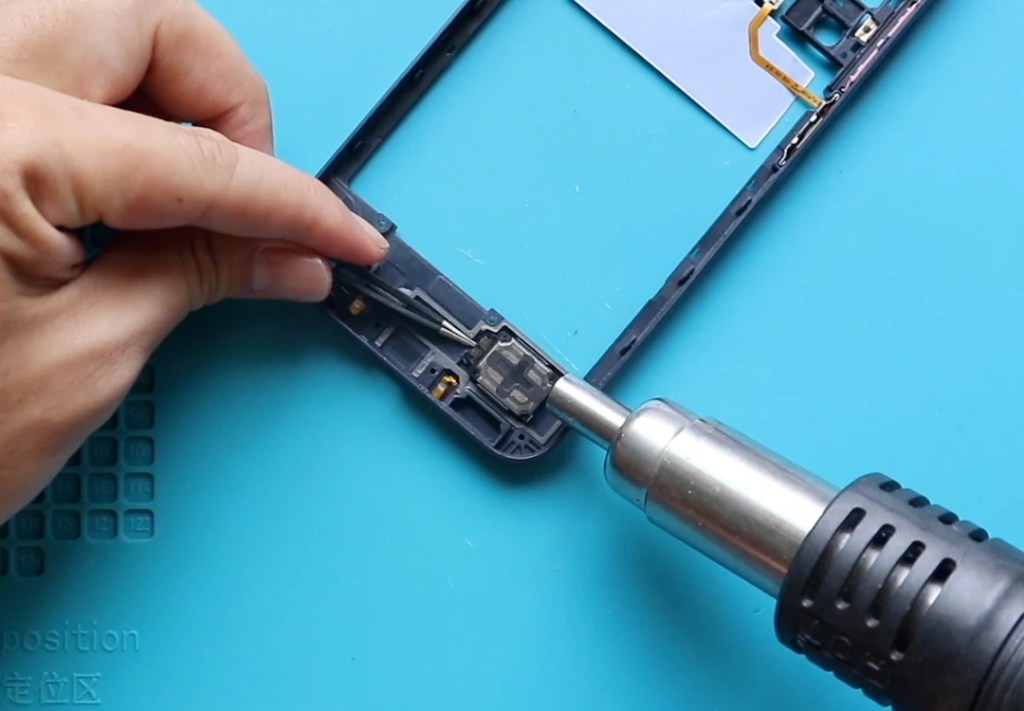
The loudspeaker module is built into the mid-frame.
- Remove the faulty speaker from the frame.
- Place and secure the new loudspeaker module in the same position.
Make sure the speaker sits flat and properly aligned inside the mid-frame housing.
Step 5 – Reassemble the Phone
Place the mid-frame back onto the phone.
Reconnect the fingerprint button connector plug.
Reinsert the SIM tray.
Secure the mid-frame by tightening all 15 screws.
Ensure all clips are properly locked before tightening the screws fully.
Before installing the back cover, check the adhesive.
If it’s weak, apply B7000 glue or replace it with new double-sided adhesive.
Press the back cover firmly onto the frame.
Use bonding clips to hold everything in place.
If clips aren’t available, rubber bands will work.
Leave them on for some time to ensure proper bonding.
Frequently Asked Questions
1. What symptoms indicate a faulty loudspeaker?
Distorted sound, low volume, crackling audio, or no sound during media playback usually points to a loudspeaker failure.
2. Is the loudspeaker separate from the earpiece speaker?
Yes. The loudspeaker is at the bottom of the phone, while the earpiece speaker is at the top.
3. Does loudspeaker replacement fix microphone issues?
No. Microphone and loudspeaker are different modules.
Microphone issues are usually related to the charging port board, not the loudspeaker.
4. Do I need to disconnect the battery?
Not required for this repair because the loudspeaker is part of the mid-frame, but disconnecting the battery is always a safer practice.
Hope you enjoyed this repair guide!
If you have any questions, let us know in the comments.
Please like, share, and subscribe for more repair guides.
Related Repair Guide