
Now Reading: Samsung Galaxy A42 5G Vibrator Motor Replacement Guide | M42 5G
-
01
Samsung Galaxy A42 5G Vibrator Motor Replacement Guide | M42 5G
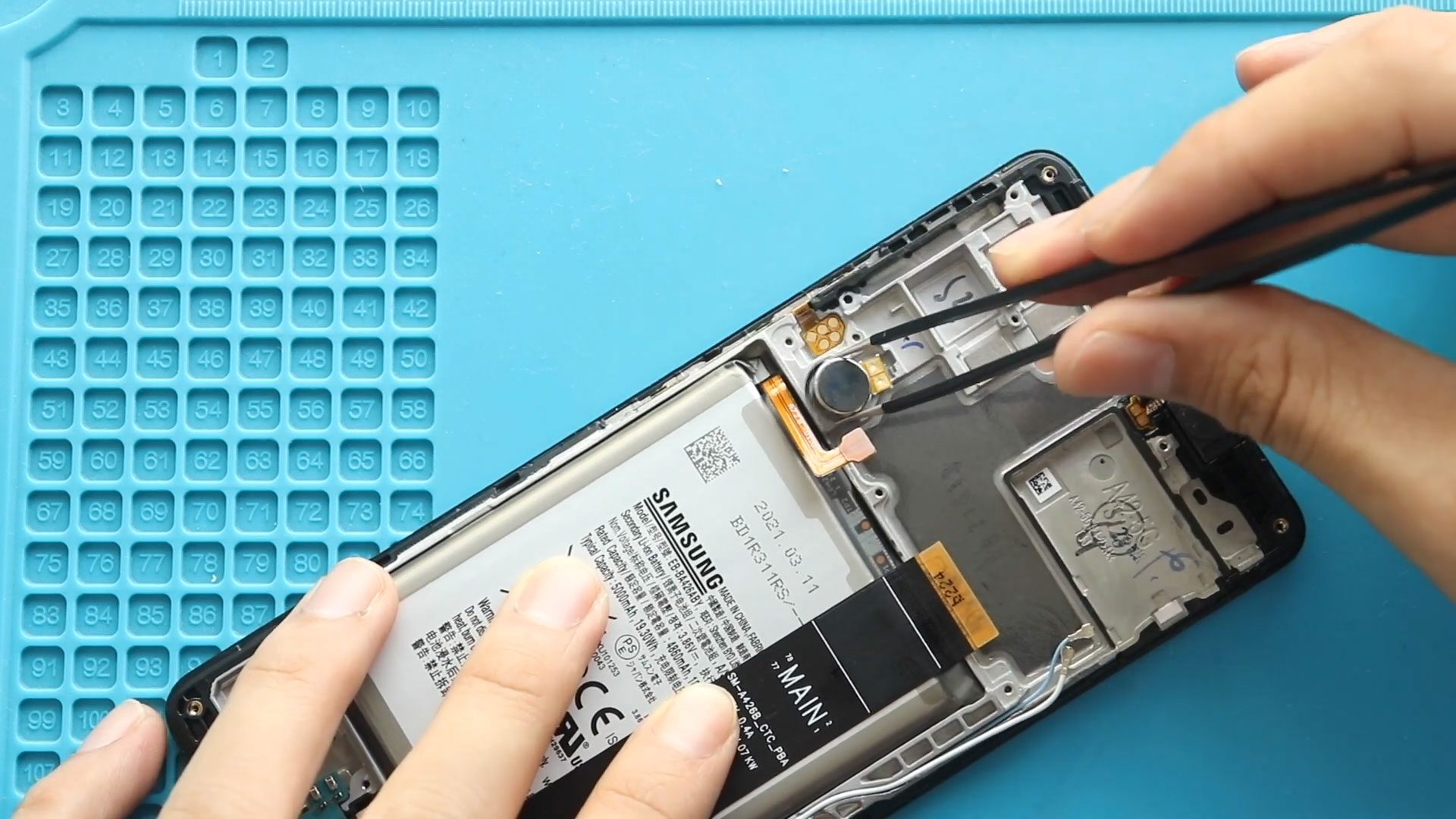
Samsung Galaxy A42 5G Vibrator Motor Replacement Guide | M42 5G
If your Samsung Galaxy A42 5G is not vibrating for calls, notifications, or alarms, the vibrator motor may be faulty. Replacing the vibrator motor can restore proper haptic feedback without replacing the entire phone.
This detailed DIY guide explains how to replace the charging port board on the Samsung Galaxy A42 5G safely and correctly.
Repair Difficulty
- Device Type: Smartphone
- Type of Repair: Charging Port & Headphone Jack Board Replacement
- Repair Difficulty: 5/10 – Moderate
- Estimated Time: 45–60 Minutes
Reasons Why You May Need This Repair
Your vibrator motor may require replacement if you notice:
- No vibration during calls, messages, or notifications
- Weak or inconsistent vibration
- Vibration only works when applying pressure to the device
- Water or dust damage
- Device was dropped, damaging the motor
- The motor vibrates with unusual noise or stuttering
- System functions work, but the vibration feature doesn’t respond
A faulty motor cannot be repaired—replacing it is the most effective solution.
Before You Begin
Compatibility and Model Numbers
- Samsung Galaxy A42 5G
- Samsung Galaxy M42 5G
This repair guide based on Samsung Galaxy A42 5G Model.
Model Numbers | SM-A426B, SM-A426B/DS, SM-A4260, SM-A426U, SM-A426U1, SM-A426N, SM-M426B, SM-M426B/DS
Tools Required
- Mobile phone heating pad or hairdryer/heat gun
- Plastic pry tool / card pry
- Suction cups
- Phillips #00/#000 screwdrivers
- Tweezers (for connectors)
- B7000 glue or double-sided adhesive (for back cover)
- Rubber bands or bonding clips to secure the back cover
Using proper tools reduces the risk of damaging the phone.
How to Find Tools and Parts
- Heating pad – https://amzn.to/3H0tHzJ
- Portable Heat Gun – https://amzn.to/4mszih1
- Clamps https://amzn.to/3GYJT4w
- STREBITO 142 Piece Repair Tool Kit https://amzn.to/3UO1jUx
- Glue | Adhesive https://amzn.to/46exVxe
- Compatible Parts –
- Battery – https://amzn.to/469eXqF
- Screen – https://amzn.to/48bD8XU
- Other Parts – https://amzn.to/4m0Ki4D
- Silicone Work Repair Mat https://amzn.to/45Emz5l
Protect Your Galaxy A42 5G
- Protector For The Screen https://amzn.to/4gbx7Nb
- Best Rated Case https://amzn.to/3JSjwyg
How to Replace Samsung Galaxy A42 5G Charging Port Board – Step by Step
Step 1. Opening the Samsung Galaxy A42 5G
Start by heating the back cover to soften the adhesive.
Use a suction cup to create an opening, then slide a plastic pry tool around the edges until the back cover separates.
Step 2. Removing the Back Cover
Lift and remove the back cover slowly.
Place it aside safely to avoid scratches.
Step 3. Removing the Mid-Frame
Unscrew all the screws securing the mid-frame.
Use a pry tool around the edges to lift and detach the frame from the device.
Step 4. Removing the Logic Board
Disconnect the flex cables and carefully lift the logic board from the chassis.
Move it aside gently, taking care not to damage surrounding components.
Step 5. Removing the Faulty Vibrator Motor
Locate the vibrator motor at the bottom of the device.
Gently pry it up using a plastic tool.
It may be lightly glued, so lift it slowly to avoid breaking the contact pads.
Step 6. Placing the New Vibrator Motor
Place the new vibrator motor in the same position.
Press down to ensure it is fully seated and aligned with the contact pads.
Step 7. Reinstalling the Logic Board
Carefully position the logic board back into its slot.
Reconnect all flex cables securely.
Step 8. Reinstalling the Mid-Frame
Place the mid-frame back on and press around the edges to lock all clips.
Add all screws back in their correct locations.
Step 9. Installing the Back Cover
Before placing the back cover, check the strength of the adhesive.
Apply B7000 glue or new adhesive tape if required.
Step 10. Closing & Binding the Back Cover
Press along all edges to ensure proper adhesion.
Secure the device using binding clips or rubber bands for 30–60 minutes.
Your Samsung Galaxy A42 5G vibrator motor replacement is now complete!
FAQs (Frequently Asked Questions)
Q1: Why does my phone still not vibrate after replacing the motor?
The motor may not be seated properly or the logic board connectors may be loose. Reopen and check alignment.
Q2: Is it normal for the vibrator motor to be glued?
Yes, most models use adhesive to keep the motor firmly in place.
Q3: Does this repair affect water resistance?
Yes. After opening the device, factory water-resistance is reduced unless re-sealed professionally.
Q4: Can vibration issues be caused by software?
Yes. Always check vibration settings and safe mode before performing hardware repairs.
Q5: Does replacing the vibrator require disconnecting the battery?
On this model, removing the mid-frame disconnects the battery automatically.
Troubleshooting
Q1: The vibrator motor makes a buzzing or rattling sound
The motor may not be sitting flat or may be touching the frame. Re-seat it.
Q2: Vibration feels very weak
Check if the mid-frame’s contact points are clean and properly pressed.
Q3: No vibration in certain apps
Check notification settings for that specific app.
Q4: Back cover won’t stay attached
Use additional B7000 glue or replace adhesive tape and clamp again.
This completes your Samsung Galaxy A42 5G Vibrator Motor replacement guide. Follow the steps carefully and your device should charge and function normally again. If you have questions, feel free to add them to your blog’s comment section.
Related Guides


-
 01Samsung Galaxy A16 5G Battery Replacement | Full DIY Repair Guide
 -
02Samsung Galaxy A16 5G Screen Replacement | Step-by-Step Guide
-
03Google Pixel 6 Power Button Replacement Guide | Volume Button Flex Repair Guide- DIY Repair
-
04Samsung Galaxy A16 5G Back Cover & Camera Lens Frame Replacement Guide | DIY Repair
-
05Why a Heating Pad Is Essential for Mobile Phone Repairs (And How to Use it)
-
06How to Use a Heat Gun or Hair Dryer for Phone/Tablet Repairs
-
07Essential Repair Tools for Phone, Tablet & Laptop Repairs


