
Now Reading: Google Pixel 4 Wireless Charging Replacement Guide
-
01
Google Pixel 4 Wireless Charging Replacement Guide
Google Pixel 4 Wireless Charging Replacement Guide
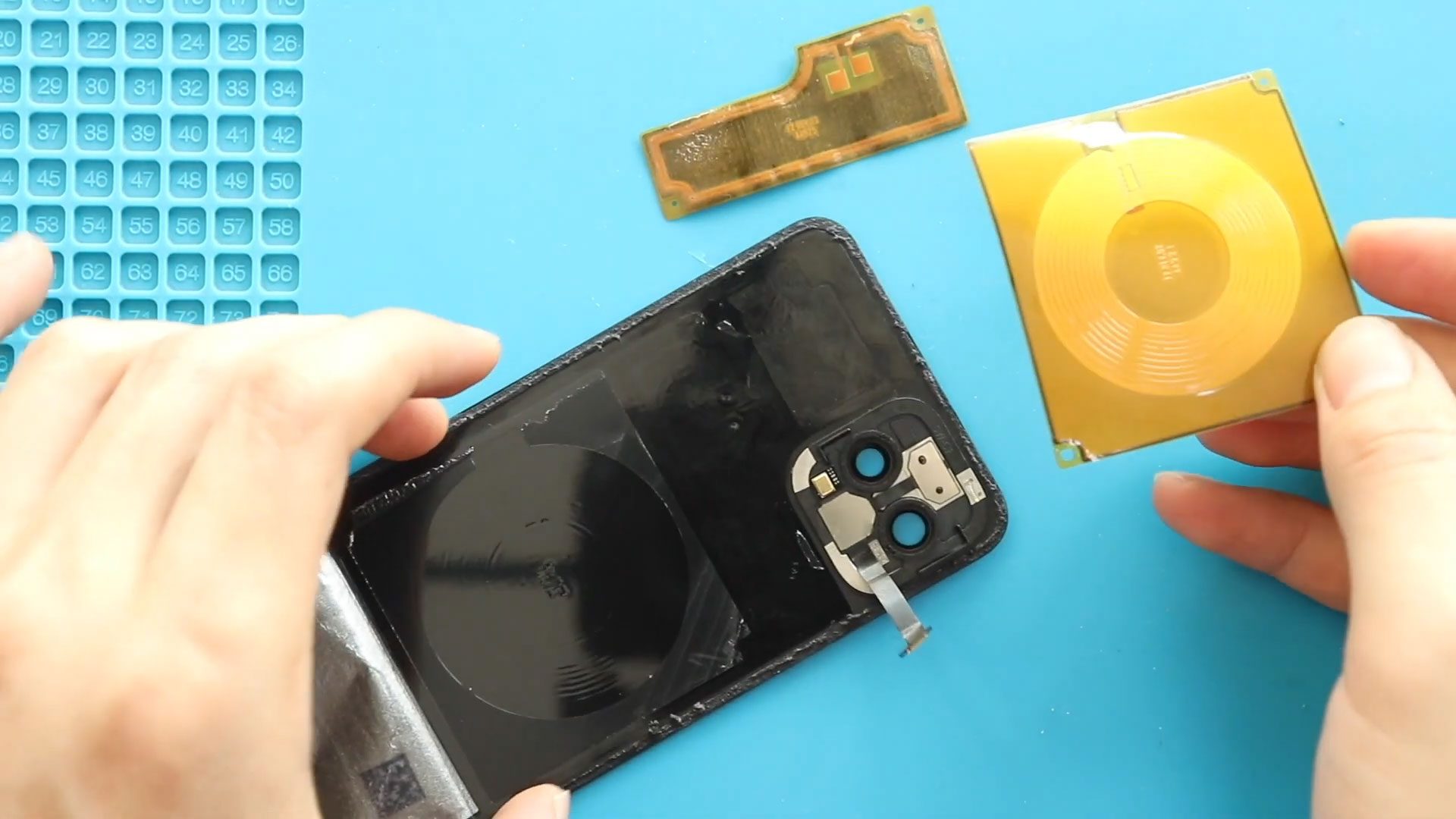
A faulty wireless charging pad can prevent your Google Pixel 4 from charging properly on a compatible wireless charging surface. Replacing the wireless charging pad requires opening the phone from the back and removing the bottom bracket and sensor bracket to access the damaged component.
In this guide, we’ll cover the Google Pixel 4 wireless charging pad replacement process, including removing the faulty pad, installing the new one, reconnecting the back cover sensor flex, and completing the reassembly.
Repair Information
| Repair Information | Details |
|---|---|
| Device | Google Pixel 4 |
| Repair Type | Wireless Charging Pad Replacement |
| Repair Difficulty | ★★★☆☆ |
| Estimated Time | Approximately 1 hour |
Reasons for Repair
You may need to replace the Google Pixel 4 wireless charging pad if you experience:
- Wireless charging is not working
- The phone does not charge when placed on a compatible wireless charger
- Wireless charging has stopped working correctly
- The wireless charging pad has been damaged
Important: Work carefully when opening the Pixel 4 and handling the internal components. Avoid excessive force around the sensor flex and other internal parts.
Before You Begin
Compatibility and Model Numbers
This repair guide based on Google Pixel 4
Model Numbers | G020M, G020I, GA01188-US, GA01187-US, GA01189-US, GA01191-US, GA01189-US
Tools Required
- Mobile phone heating pad or hairdryer/heat gun
- Plastic pry tool / card pry
- Suction cups
- Torx T3 screwdriver
- Torx T4 screwdriver
- Torx T5 screwdriver
- Tweezers (for connectors)
- B7000 glue or double-sided adhesive (for back cover)
- Rubber bands or bonding clips to secure the back cover
How to Find Tools and Parts
- Heat Mat / Heating Pad – https://amzn.to/3H0tHzJ
- Best Portable Heat Gun – https://amzn.to/4cZYnhL
- Clamps – https://amzn.to/3GYJT4w
- STREBITO 142 Piece Repair Tool Kit – https://amzn.to/3UO1jUx
- Stronger Suction Cup – https://amzn.to/3UVb6YR
- Silicone Work Repair Mat – https://amzn.to/4euW6fs
- Must Have Glue | Adhesive – https://amzn.to/4uxhKog
- Compatible Parts –
- Battery – https://amzn.to/4nGxS2N
- Screen – https://amzn.to/3X7WHK5
- Other Parts – https://amzn.to/4oPpM90
Step 1: Open the Google Pixel 4
Begin by powering off the Google Pixel 4 before starting the repair.
The wireless charging pad is accessed from the back of the phone, so the back cover needs to be removed first. Work carefully around the edges when opening the device to avoid damaging the phone or its components.
Step 2: Remove the Back Cover
Carefully separate and remove the back cover from the Google Pixel 4.
Take your time during this step and avoid applying unnecessary force. Set the back cover aside safely once it has been removed.
Step 3: Remove the Bottom Bracket
With the back cover removed, access the bottom bracket.
Carefully remove the bottom bracket and keep the removed hardware organized for reassembly. This provides access to the components underneath.
Step 4: Remove the Sensor Bracket
Next, remove the sensor bracket.
Work carefully while removing the bracket, as the back cover sensor flex will need to be handled during the reassembly process.
Set the bracket aside with the other removed components.
Step 5: Remove the Faulty Wireless Charging Pad
The non-working Google Pixel 4 wireless charging pad can now be accessed.
Carefully remove the faulty wireless charging pad from the phone. Avoid using excessive force around the surrounding components.
Before removing it completely, take note of how the original pad is positioned so the replacement can be installed correctly.
Step 6: Install the New Wireless Charging Pad
Place the new Google Pixel 4 wireless charging pad into its correct position.
Make sure the replacement pad is properly aligned and seated before continuing. Do not force the component into place.
Correct positioning is important for the wireless charging pad to function properly after the phone is reassembled.
Step 7: Reinstall the Back Cover Sensor Flex
With the new wireless charging pad installed, reconnect and position the back cover sensor flex.
Make sure the flex is correctly positioned and secured before continuing with the remaining reassembly.
Work carefully around the flex to avoid bending or damaging it.
Step 8: Reinstall the Bottom Bracket
Place the bottom bracket back into its original position.
Reinstall the removed hardware and make sure the bracket is seated correctly before moving on to the final closure of the phone.
Step 9: Close the Google Pixel 4 and Install the Back Cover
Finish the repair by reinstalling the back cover.
Make sure the cover is properly aligned with the housing and securely seated around the phone.
Once the device is fully reassembled, test the wireless charging function with a compatible wireless charger to verify that the new charging pad is working correctly.
End of Repair Guide
The Google Pixel 4 wireless charging pad replacement is now complete. Place the phone on a compatible wireless charger and verify that charging starts normally before considering the repair finished.
FAQ
Do I need to remove the screen for this wireless charging pad repair?
No. This repair is performed from the back of the Google Pixel 4. The back cover, bottom bracket, and sensor bracket are removed to access the wireless charging pad.
What components need to be removed before replacing the wireless charging pad?
The procedure includes removing the back cover, bottom bracket, and sensor bracket before accessing the faulty wireless charging pad.
Does the back cover sensor flex need to be reinstalled?
Yes. The back cover sensor flex is placed during reassembly before the bottom bracket and back cover are installed.
How can I test the replacement wireless charging pad?
After completing the repair, place the Google Pixel 4 on a compatible wireless charger and check whether the phone begins charging.
What should I check if wireless charging still does not work?
Check that the replacement wireless charging pad is correctly positioned and that the related components were properly reinstalled during the repair.
Troubleshooting
The back cover is not sitting correctly after reassembly. What should I check?
Check that the internal components, sensor flex, and bottom bracket are properly positioned. Make sure nothing is preventing the back cover from seating correctly.
I am having difficulty removing the back cover. What should I do?
Work carefully around the back cover and avoid excessive force. The cover should be separated gradually rather than forced away from the phone.
The new wireless charging pad does not work after installation. What should I check?
Verify that the replacement pad is correctly positioned and that the components removed during the repair have been properly reinstalled.
The sensor flex was disturbed during the repair. What should I do?
Check that the back cover sensor flex is correctly positioned and secured before closing the phone.
Related Guides


-
 01Samsung Galaxy A16 5G Battery Replacement | Full DIY Repair Guide
 -
02Samsung Galaxy A16 5G Screen Replacement | Step-by-Step Guide
-
03Google Pixel 6 Power Button Replacement Guide | Volume Button Flex Repair Guide- DIY Repair
-
04Samsung Galaxy A16 5G Back Cover & Camera Lens Frame Replacement Guide | DIY Repair
-
05Why a Heating Pad Is Essential for Mobile Phone Repairs (And How to Use it)
-
06How to Use a Heat Gun or Hair Dryer for Phone/Tablet Repairs
-
07Essential Repair Tools for Phone, Tablet & Laptop Repairs


