
Now Reading: Motorola Moto G Stylus 5G XT2131 Charging Port & Headphone Jack Board Replacement Guide
-
01
Motorola Moto G Stylus 5G XT2131 Charging Port & Headphone Jack Board Replacement Guide
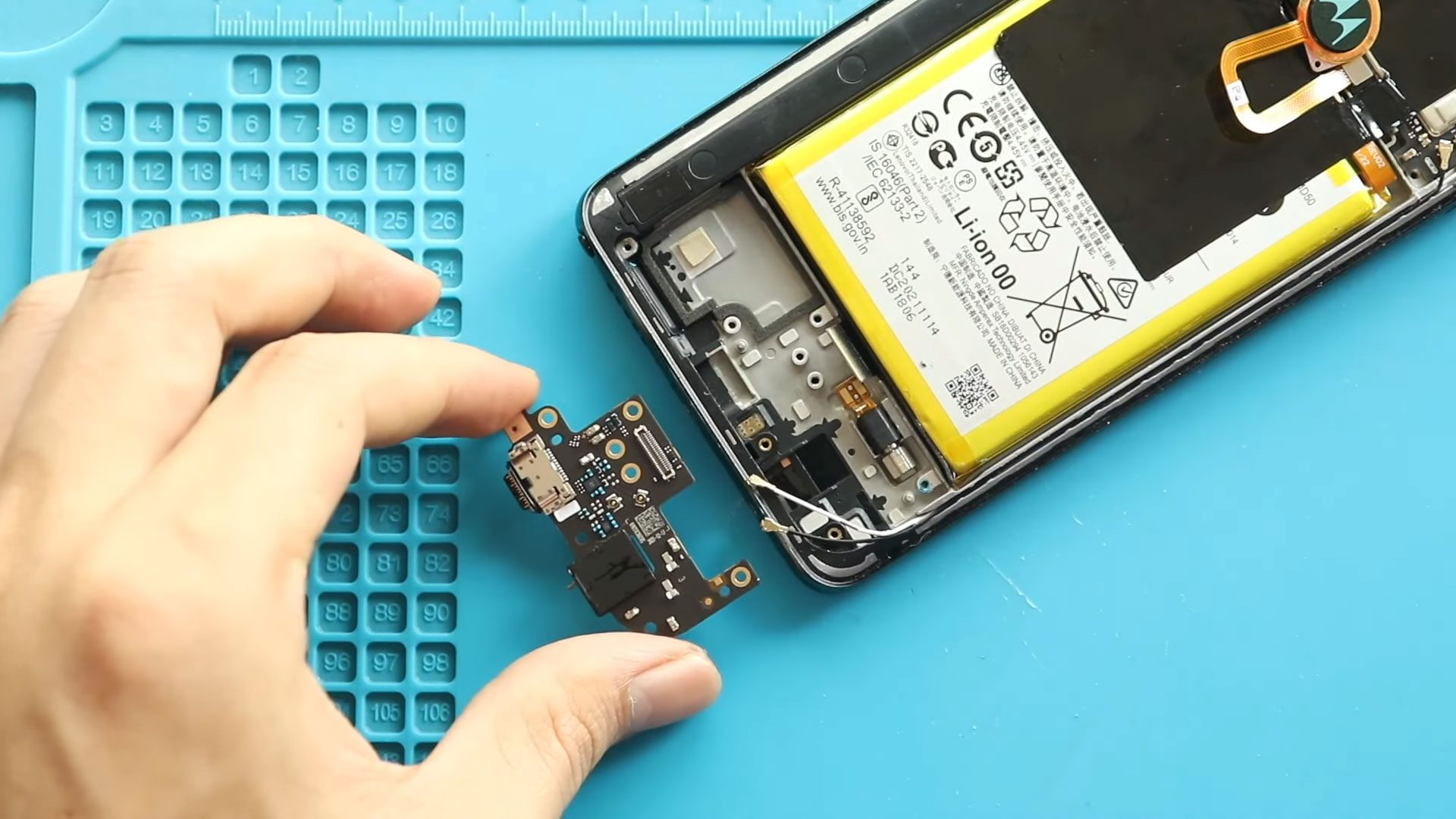
Motorola Moto G Stylus 5G XT2131 Charging Port & Headphone Jack Board Replacement Guide
Hi everyone, welcome back to Geardo 👋
Today, we’ll guide you through a complete, beginner-friendly repair tutorial on how to replace the charging port and headphone jack board on your Motorola Moto G Stylus 5G.
If your phone is not charging properly, has loose cable connections, or your headphone jack isn’t working, this repair can solve those issues effectively.
🔧 Repair Overview
- Device Type: Smartphone
- Device Model: Motorola Moto G Stylus 5G
- Repair Type: Charging Port & Headphone Jack Board Replacement
⭐ Repair Difficulty : ★★★★★★☆☆☆☆ (6/10 – Moderately Difficult)
⏱️ Time Required – 60 – 75 minutes
🔍 Reasons for This Repair
- Phone not charging or slow charging
- Loose or unstable charging cable connection
- Headphone jack not detecting earphones
- Audio issues when using wired headphones
- Dust or corrosion damage to the charging board
Check The Latest Motorola Phones are in Clearance “up to 60% off” – https://amzn.to/480ho0w
Before You Begin
Compatibility and Model Numbers
- Motorola Moto Stylus 5G (2021)
Model Numbers | XT2131, XT2131DL, XT2131-1, XT2131-3, XT2131-4
Tools Required
- Mobile phone heating pad or hairdryer/heat gun
- Plastic pry tool / card pry
- Suction cups
- Phillips #00/#000 screwdrivers
- Torx T3 / T4 / T5 Screwdriver (Depends on the version)
- Flathead Screwdriver
- Tweezers (for connectors)
- B7000 glue or double-sided adhesive (for back cover)
- Rubber bands or bonding clips to secure the back cover
Using proper tools reduces the risk of damaging the phone.
How to Find Tools and Parts
- Heating pad – https://amzn.to/3H0tHzJ
- Portable Heat Gun – https://amzn.to/4mszih1
- Clamps https://amzn.to/3GYJT4w
- STREBITO 142 Piece Repair Tool Kit https://amzn.to/3UO1jUx
- Glue | Adhesive https://amzn.to/46exVxe
- Compatible Parts –
- Battery – https://amzn.to/46u7VNl
- Screen – https://amzn.to/47LQSbS
- Other Parts – https://amzn.to/3Vp6SZX
- Silicone Work Repair Mat https://amzn.to/45Emz5l
Step-by-Step Charging Port Replacement Guide
Step 1: Remove the Back Cover
Heat around the back cover edges to soften the adhesive using a heating pad, heat gun, or hairdryer.
Use a suction cup to lift slightly and insert a plastic pry tool to cut through the adhesive.
Carefully remove the back cover while holding the fingerprint button area.
Step 2: Remove the Top Frame
Unscrew the eight screws securing the logic board frame and gently lift it out.
Step 3: Disconnect the Battery
Move the fingerprint button aside and disconnect the battery connector.
Step 4: Remove the Speaker Cover
Unscrew the seven screws holding the bottom speaker cover and remove it carefully.
Step 5: Disconnect Antennas
Detach both antenna cables from the charging board.
Step 6: Remove the Charging Port Board
Disconnect the main ribbon cable.
Remove the screw securing the board.
Gently lift and remove the faulty charging port and headphone jack board.
Step 7: Install the New Board
Place the new charging port board into position.
Secure it with the screw and reconnect the main ribbon cable.
Step 8: Reconnect Components
Reconnect both antenna cables securely.
Reinstall the speaker cover and tighten the seven screws.
Reconnect the battery and reposition the fingerprint button.
Step 9: Reassemble the Device
Reinstall the logic board frame and secure it with the eight screws.
Before closing the back cover:
- Ensure adhesive is intact
- Apply B7000 glue or new adhesive if needed
Place the back cover and press firmly.
Use clips or rubber bands to hold it in place until the adhesive sets.
❓ Frequently Asked Questions (FAQ)
1. How do I know if my charging port is damaged?
If your phone only charges at certain angles or doesn’t charge at all, the charging port board is likely faulty.
2. Can I replace only the charging port?
On this model, the charging port and headphone jack are combined on a single board, so both are replaced together.
3. Is this repair beginner-friendly?
Yes, but it requires careful handling of small connectors and screws.
4. Will this fix headphone issues?
Yes, if the issue is hardware-related to the jack board.
5. Do I need special adhesive?
Using B7000 glue or pre-cut adhesive ensures proper sealing and durability.
🛠️ Troubleshooting (Q&A Format)
1. Phone not charging after replacement
- Check ribbon cable connection
- Ensure board is properly seated
- Try a different charging cable
2. No audio from headphone jack
- Recheck jack alignment
- Ensure board connection is secure
- Test with different headphones
3. Weak network signal after repair
- Ensure antenna cables are properly connected
- Check if connectors are snapped in place
4. Back cover not sticking
- Apply new adhesive
- Use clips or rubber bands for better bonding
5. Phone not turning on
- Reconnect battery properly
- Charge device for a few minutes before retrying
✅ Final Thoughts
You’ve now completed the charging port and headphone jack board replacement on your Motorola Moto G Stylus 5G 🎉
Take your time with each step and handle components carefully to avoid damage. This repair can significantly improve your phone’s usability and extend its life.
If you have any questions, feel free to ask and share your experience 👍
Other Moto G Stylus 5G Repair Guides


-
 01Samsung Galaxy A16 5G Battery Replacement | Full DIY Repair Guide
 -
02Samsung Galaxy A16 5G Screen Replacement | Step-by-Step Guide
-
03Google Pixel 6 Power Button Replacement Guide | Volume Button Flex Repair Guide- DIY Repair
-
04Samsung Galaxy A16 5G Back Cover & Camera Lens Frame Replacement Guide | DIY Repair
-
05Why a Heating Pad Is Essential for Mobile Phone Repairs (And How to Use it)
-
06How to Use a Heat Gun or Hair Dryer for Phone/Tablet Repairs
-
07Essential Repair Tools for Phone, Tablet & Laptop Repairs


