
Now Reading: OnePlus 8 Pro Vibrator Motor Replacement Guide | DIY Repair
-
01
OnePlus 8 Pro Vibrator Motor Replacement Guide | DIY Repair
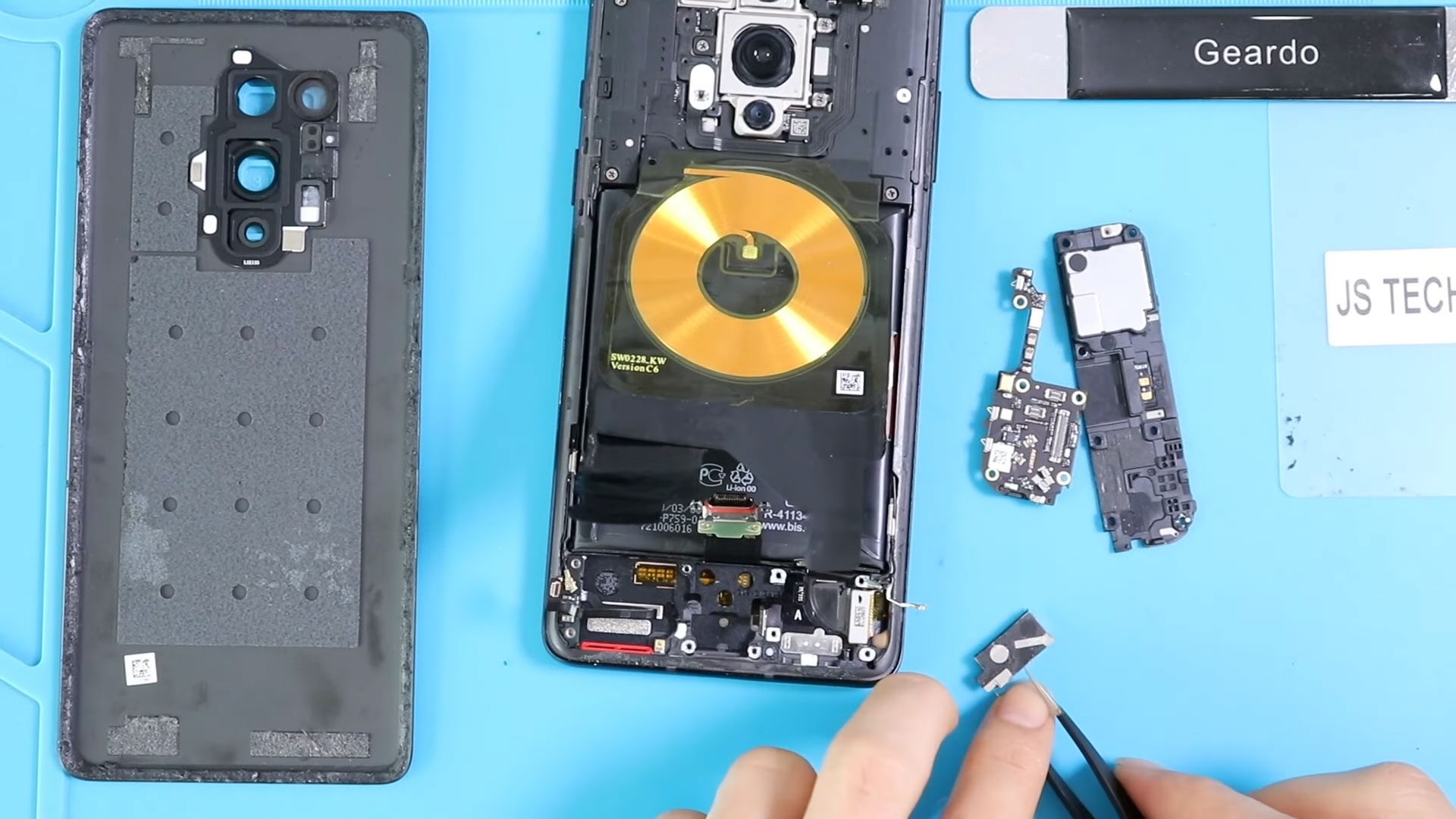
OnePlus 8 Pro Vibrator Motor Replacement Guide | DIY Repair
If your OnePlus 8 Pro isn’t vibrating during calls, notifications, or alarms, it’s likely a faulty vibrator motor. Replacing it restores haptic feedback so you never miss alerts. This guide walks you through a safe, step-by-step repair at home.
Repair Overview
- Device Type: Android Smartphone
- Model: OnePlus 8 Pro
- Type of Repair: Vibrator Motor Replacement
Repair Difficulty : ★★★★☆☆☆☆☆ (4/10 – Moderate)
Estimated Time: 35–50 minutes
Reasons for Vibrator Motor Replacement
- Phone does not vibrate during calls, messages, or notifications
- Weak or inconsistent vibration
- Physical or water damage affecting haptic feedback
- Faulty internal connections causing vibration failure
Before You Begin
Compatibility and Model Numbers
- Oneplus 8 Pro
This repair guide based on OnePlus 8 Pro
Model Numbers | IN2023, IN2020, IN2021, IN2025
Tools Required
- Mobile phone heating pad or hairdryer/heat gun
- Plastic pry tool / card pry
- Suction cups
- Phillips #00/#000 screwdrivers
- Torx T3 / T4 Screwdriver
- Flathead Screwdriver
- Tweezers (for connectors)
- B7000 glue or double-sided adhesive (for back cover)
- Rubber bands or bonding clips to secure the back cover
Using proper tools reduces the risk of damaging the phone.
How to Find Tools and Parts
- Heat Mat / Heating Pad – https://amzn.to/3H0tHzJ
- Portable Heat Gun – https://amzn.to/4mszih1
- Clamps https://amzn.to/3GYJT4w
- STREBITO 142 Piece Repair Tool Kit https://amzn.to/3UO1jUx
- Suction Cup https://amzn.to/3UVb6YR
- Silicone Work Repair Mat https://amzn.to/45Emz5l
- Glue | Adhesive https://amzn.to/47UTKmE
✅ Protect Your Oneplus 8 Pro
- Best Rated Cases https://amzn.to/47fTWen
- Top Screen Protection https://amzn.to/4qzYIwi
Step-by-Step Vibrator Motor Replacement
Opening the OnePlus 8 Pro
Power off the phone. Heat the edges of the back cover to soften the adhesive. Use a suction cup and plastic pry tool to lift the back cover carefully. Remove the SIM tray before starting.
Step 1. Removing the Secondary Board Cover
Unscrew and remove the protective cover over the secondary board to access the vibrator motor.
Step 2. Removing the Secondary Board
Disconnect all connectors and carefully lift the secondary board to reveal the vibrator motor.
Step 3. Removing the Faulty Vibrator Motor
Locate the broken vibrator motor. Disconnect it from its connector and gently lift it out without damaging surrounding components.
Step 4. Installing the New Vibrator Motor
Place the new vibrator motor in its original position and reconnect the cable to the secondary board.
Step 5. Reassembling the Secondary Board
Reinstall the secondary board, reconnect all cables, and secure it in place. Place the secondary board cover back over the assembly and tighten all screws.
Step 6. Closing the Device
Ensure all components are properly seated. Check the back cover adhesive; if weak, apply B7000 glue or double-sided adhesive. Press the cover firmly into place and use binding clips or rubber bands to hold it until the adhesive sets.
Frequently Asked Questions (FAQ)
Q1: Can I replace the vibrator motor myself?
Yes, this is a moderate-level repair suitable for DIY repair enthusiasts with the proper tools.
Q2: How do I know the vibrator motor is faulty?
If your device does not vibrate at all, vibrates weakly, or inconsistently during notifications or calls, the motor may need replacement.
Q3: Will this repair affect other components?
No, as long as you carefully handle the secondary board and connectors.
Q4: What adhesive should I use for the back cover?
B7000 glue or double-sided adhesive designed for smartphone back covers works best.
Troubleshooting After Replacement
Q1: Device still doesn’t vibrate?
- Ensure the vibrator motor connector is fully seated.
- Check that the motor is positioned correctly.
Q2: Vibration feels weak or inconsistent?
- Confirm the replacement motor is compatible with the OnePlus 8 Pro.
- Remove any debris or obstruction around the motor area.
Q3: Back cover not sealing properly?
- Apply fresh adhesive and use binding clips or rubber bands to secure it.
Q4: Other components not working?
- Double-check that all secondary board connectors are properly reattached.
Replacing the Vibrator Motor on the OnePlus 8 Pro is a moderate-level repair that can significantly restore your device’s haptic and vibration functionality. With patience, proper tools, and careful handling, you can complete this repair successfully at home.
If you found this guide useful, you’re welcome to explore additional repair tutorials to help keep your devices operating at peak performance.
Related Guides


-
 01Samsung Galaxy A16 5G Battery Replacement | Full DIY Repair Guide
 -
02Samsung Galaxy A16 5G Screen Replacement | Step-by-Step Guide
-
03Google Pixel 6 Power Button Replacement Guide | Volume Button Flex Repair Guide- DIY Repair
-
04Samsung Galaxy A16 5G Back Cover & Camera Lens Frame Replacement Guide | DIY Repair
-
05Why a Heating Pad Is Essential for Mobile Phone Repairs (And How to Use it)
-
06How to Use a Heat Gun or Hair Dryer for Phone/Tablet Repairs
-
07Essential Repair Tools for Phone, Tablet & Laptop Repairs


