
Now Reading: Google Pixel 5 Front Camera Replacement Guide
-
01
Google Pixel 5 Front Camera Replacement Guide
Google Pixel 5 Front Camera Replacement Guide
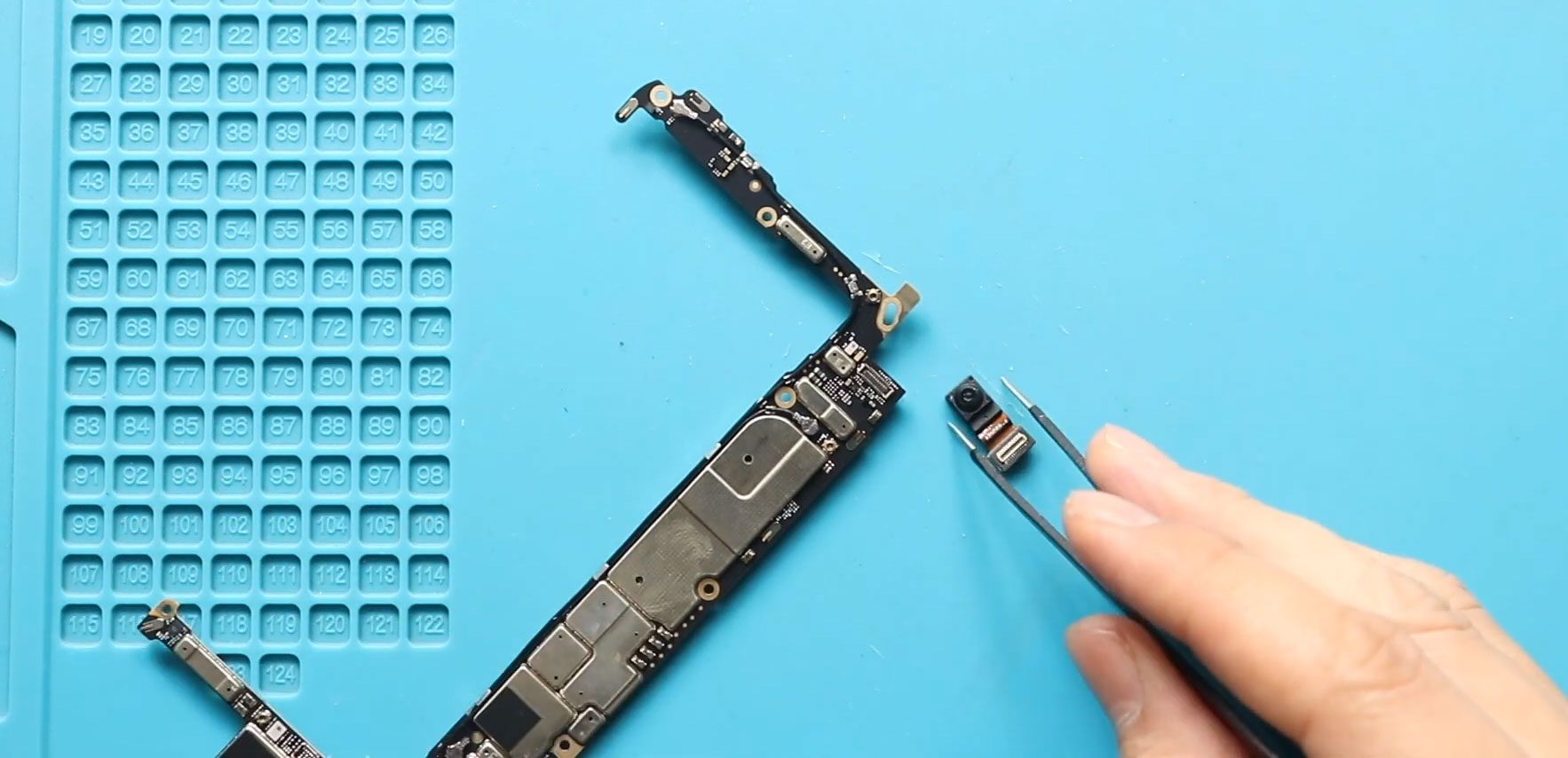
The Google Pixel 5 front camera is integrated into the phone’s internal assembly, so replacing it requires more than simply removing the camera module. The repair involves removing the display, board bracket, battery, rear camera unit, and logic board before the faulty front camera can be accessed.
This beginner-friendly Google Pixel 5 front camera replacement guide follows the repair procedure step by step, including safely separating the display, removing the logic board, replacing the front camera, testing the phone, and resealing the screen.
Repair Information
| Repair Information | Details |
|---|---|
| Device | Google Pixel 5 |
| Repair Type | Front Camera Replacement |
| Repair Difficulty | ★★★★☆ |
| Estimated Time | Approximately 1–2 hours |
Reasons for the Repair
You may need to replace the Google Pixel 5 front camera if you experience:
- Front camera not working
- Front camera failing to open or operate correctly
- Problems with the front camera after damage or component failure
- The original front camera no longer functioning properly
Important: Take extra care when removing the display and working around the logic board and flex cables. Avoid using excessive force on internal components.
Before You Begin
Compatibility and Model Numbers
This repair guide based on Google Pixel 5
Model Numbers | GD1YQ, GTT9Q, G5NZ6
Tools Required
- Mobile phone heating pad or hairdryer/heat gun
- Plastic pry tool / card pry
- Suction cups
- Torx T3 screwdriver
- Torx T4 screwdriver
- Torx T5 screwdriver
- Tweezers (for connectors)
- B7000 glue or double-sided adhesive (for back cover)
- Rubber bands or bonding clips to secure the back cover
How to Find Tools and Parts
- Heat Mat / Heating Pad – https://amzn.to/3H0tHzJ
- Best Portable Heat Gun – https://amzn.to/4cZYnhL
- Clamps – https://amzn.to/3GYJT4w
- STREBITO 142 Piece Repair Tool Kit – https://amzn.to/3UO1jUx
- Stronger Suction Cup – https://amzn.to/3UVb6YR
- Silicone Work Repair Mat – https://amzn.to/4euW6fs
- Must Have Glue | Adhesive – https://amzn.to/4uxhKog
- Compatible Parts –
- Battery – https://amzn.to/3JEaxAO
- Screen – https://amzn.to/4oiq0p7
- Other Parts – https://amzn.to/4hCRy6a
Step-by-Step Repair
Step 1: Heat and Remove the LCD Screen
Start by gently heating around the edges of the Google Pixel 5 display to soften the adhesive holding the screen in place.
In this repair, a heating pad is used. Place the phone with the front screen facing the heating pad, select the mobile phone heating option, and allow the heating cycle to complete. A heat gun or hairdryer can also be used as an alternative.
Once the adhesive has softened, use a suction cup to lift the display slightly. Insert a plastic card pry tool into the opening and carefully work around the edges to separate the adhesive.
Be especially careful around the left-hand side of the screen, where the display flex connector is located. Use the edge of the plastic pry tool and avoid pushing it too deeply into the phone.
Gradually lift the screen from the right-hand side toward the left and leave it open like a book.
Step 2: Disconnect and Remove the Display
Use a tweezer to remove the LCD connector bracket.
Next, disconnect the LCD connector from the board. Once the connector has been disconnected, the display can be completely separated from the phone body.
After removing the screen, clean the edges of the frame to prepare the phone for reassembly later.
Step 3: Remove the Graphite Tape and Board Bracket
Release the graphite tape before removing the board bracket.
Next, remove the ten screws holding the board bracket.
There are also two screws with a small shield hidden above the charging port board. Peel back the tape covering this area, remove both screws, and pull out the bracket.
Once the screws have been removed, gently pull the board bracket from the phone body.
Step 4: Disconnect and Remove the Battery
Disconnect the battery plug from the board.
Next, remove the battery adhesive by pulling both adhesive tabs. The number of adhesive tabs can vary depending on previous repairs and the technique used during an earlier battery installation.
After removing the adhesive, gently use a pry tool to lift the battery from the phone body.
Take care while removing the battery and avoid using unnecessary force.
Step 5: Disconnect and Remove the Rear Camera Unit
Disconnect the two camera connector plugs from the board.
Next, remove the screw securing the rear camera unit.
Once the screw has been removed, gently pull the rear camera unit away from the board.
[INTERNAL LINK: Related repair guide]
Step 6: Remove the Logic Board
Before removing the logic board, disconnect the two connector plugs connected to it.
Next, remove the two screws holding the logic board in place. One screw is located at the top left, while the other is at the bottom right.
Eject the SIM tray before lifting the logic board.
Once the SIM tray has been removed, gently pull the logic board out of the phone body.
Be careful while handling the board and its flex connections.
Step 7: Remove the Faulty Front Camera
Flip the logic board over to access the front camera.
Disconnect and remove the non-working front camera from the board.
Handle the logic board carefully during this process to avoid unnecessary pressure on the board or connected components.
Step 8: Install the New Front Camera
Place the replacement front camera onto the logic board and secure it in position.
Once the new front camera is installed, the logic board can be returned to the phone body.
Step 9: Reinstall the Logic Board
Carefully place the logic board back into the phone body.
Be gentle with the flex cables while positioning the board.
Reinstall the two screws that hold the logic board in place.
Next, insert the SIM tray.
Reconnect both connector plugs to the logic board and make sure the connections are properly secured.
Step 10: Reinstall the Rear Camera Unit
Place the rear camera unit back into position.
Secure the camera unit with its screw and reconnect both camera connector plugs to the board.
Make sure the camera unit is positioned correctly before continuing with the battery installation.
Step 11: Reinstall the Battery
Place the battery back into the phone using adhesive to secure it.
Reconnect the battery plug to the board.
Once the battery has been connected, reinstall the board bracket.
Secure the bracket using the ten screws removed earlier.
Remember to reinstall the small shield when securing the two screws located above the charging port board.
Step 12: Test the Front Camera and Display
Before permanently securing the LCD screen, reconnect the display for testing.
Check the phone and confirm that the replacement front camera is working correctly.
Once the testing has passed, disconnect and remove the screen again so it can be permanently secured.
Step 13: Apply Adhesive and Reinstall the LCD Screen
Before securing the display, make sure there is enough adhesive around the screen.
You can use B7000 glue or new double-sided LCD adhesive. In this repair, B7000 glue is used.
Reconnect the LCD connector and reinstall the connector bracket.
Carefully slide the screen into position, starting from the left and moving toward the right.
Once the display is correctly positioned, gently apply pressure around the screen edges.
Step 14: Secure the Display
Use bonding clips to hold the LCD screen firmly against the phone while the adhesive sets.
Leave the clips in place for some time before removing them.
If bonding clips are not available, rubber bands can be used to provide pressure and hold the screen against the phone body while the adhesive sets.
End of Repair Guide
The Google Pixel 5 front camera replacement is now complete. After the adhesive has secured the display, power on the phone and test the front camera, display, and other functions affected during the repair.
FAQ
Does the Google Pixel 5 display need to be removed to replace the front camera?
Yes. The repair procedure requires removing the display to access the internal components and eventually reach the logic board and front camera.
Why does the battery need to be removed?
The battery is removed as part of the procedure to provide access to the components and logic board required for the front camera replacement.
Does the logic board need to be removed?
Yes. The front camera is accessed by removing the logic board and then flipping it over to disconnect and remove the faulty camera.
Does the rear camera need to be removed?
Yes. The rear camera unit is disconnected and removed before the logic board can be taken out of the phone.
Should the front camera be tested before closing the phone?
Yes. The display is reconnected for testing before it is permanently secured. This allows the repair to be checked before the screen is glued back into place.
Troubleshooting
The front camera still does not work after replacement. What should I check?
Recheck the front camera installation and the connections associated with the logic board. Make sure the replacement camera is correctly positioned and connected.
The display does not work after reassembly. What should I check?
Check the LCD connector and make sure it is properly connected to the board. Also verify that the LCD connector bracket has been installed correctly.
The screen is not sitting properly after installation. What should I do?
Check the alignment of the screen and make sure it is correctly positioned around the phone frame. The display should be held firmly with bonding clips or rubber bands while the adhesive sets.
The logic board is difficult to reinstall. What should I check?
Make sure the SIM tray has been ejected and the board is correctly aligned with the phone body. Handle the flex cables carefully while positioning the board.
The screen adhesive is not holding firmly. What should I check?
Make sure sufficient B7000 glue or new double-sided LCD adhesive has been applied. Keep the display firmly pressed against the phone using bonding clips or rubber bands while the adhesive sets.
Related Guides
Pixel 4A 5G Battery Change Guide


-
 01Samsung Galaxy A16 5G Battery Replacement | Full DIY Repair Guide
 -
02Samsung Galaxy A16 5G Screen Replacement | Step-by-Step Guide
-
03Google Pixel 6 Power Button Replacement Guide | Volume Button Flex Repair Guide- DIY Repair
-
04Samsung Galaxy A16 5G Back Cover & Camera Lens Frame Replacement Guide | DIY Repair
-
05Why a Heating Pad Is Essential for Mobile Phone Repairs (And How to Use it)
-
06How to Use a Heat Gun or Hair Dryer for Phone/Tablet Repairs
-
07Essential Repair Tools for Phone, Tablet & Laptop Repairs


