
Now Reading: iPad 8 10.2″ Headphone Jack Replacement Guide
-
01
iPad 8 10.2″ Headphone Jack Replacement Guide
iPad 8 10.2″ Headphone Jack Replacement Guide
Hi everyone, welcome back to DIYGeardo.
The headphone jack on the Apple iPad 8 (10.2″) can stop working due to dust buildup, liquid damage, or a damaged flex cable. Common issues include sound cutting out, audio only working on one side, or headphones not being detected at all.
In this guide, we’ll show you how to replace the headphone jack on the iPad 8th Generation 2020 (10.2″). This step-by-step repair guide is also fully compatible with the iPad 7th Generation 2019 (10.2″), as both models share a similar internal design.
Before starting, make sure you have the right tools to proceed with the repair, which you can find in the description.
Repair Information
- Repair Type: Headphone Jack Flex Replacement
- Estimated Time: 60–90 minutes
- Repair Difficulty: ★★★★☆ (Moderate to Advanced)
- Device Compatibility:
- iPad 8th Gen (2020) 10.2″
- iPad 7th Gen (2019) 10.2″
Before You Begin
Compatibility and Model Numbers
This repair guide based on iPad 8, 10.2″-inch, 2020 model. Compatible with Both Wifi and Cellular Edition models. This Guide is Also Compatible With iPad 7, 10.2″-inch, 2019 model.
iPad 8 Generation, A2603, A2604, iPad 7 generation, A2197, A2200, A2198
Required Tools
- Heating pad / heat gun / hairdryer
- Suction cup
- Plastic card pry tools / opening picks/ Tweezers
- Phillips screwdriver #00 / #000
- Adhesive (B7000 or double-sided back cover adhesive)
- Bonding clips or rubber bands (optional but recommended)
Make sure the phone is turned off and the SIM tray is removed (For Cellular Version)before starting.
How to Find Tools and Parts
- Heating pad – https://amzn.to/3H0tHzJ
- Portable Heat Gun – https://amzn.to/4mszih1
- Clamps https://amzn.to/3GYJT4w
- STREBITO 142 Piece Repair Tool Kit https://amzn.to/3UO1jUx
- Glue | Adhesive https://amzn.to/46exVxe
- Compatible Parts –
- Battery – https://amzn.to/464Fs1r
- Touch Screen – https://amzn.to/4fU3cJ1
- LCD Screen – https://amzn.to/40WixTg
- Other Parts – https://amzn.to/4pySpY2
- Silicone Work Repair Mat https://amzn.to/45Emz5l
Step 1: Heating the Screen
Proper heating is required to separate the screen from the body during tablet repair.
For this, we use a heating pad designed for tablets and mobile phones.
On the iPad 2020 model, make sure to heat the front side. Select the tablet heating option and allow the heating cycle to complete.
Alternatively, you can use a heat gun or hair dryer.
Step 2: Opening the Digitizer
Once the heating is complete:
- Attach a suction cup near the edge of the screen and gently lift
- Insert a plastic card pry tool or triangle picker
- Carefully cut through the adhesive around the edges
⚠️ Be gentle while pulling, as flex cables are attached to the logic board.
Step 3: Lifting the Touch Screen
- Lift the touch screen like opening a book, from left to right
- Place it open carefully to access the LCD screen
Step 4: Removing the LCD Screen
- Peel off the tape covering the LCD screw heads
- Remove four screws securing the LCD
- Lift the LCD to a 90-degree angle
- Remove three screws holding the LCD connector shield
- Disconnect the LCD flex cable
Note: The shield is missing on this device, but your iPad should normally have it.
Step 5: Disconnecting Digitizer & Home Button
- Disconnect both digitizer connectors from the socket
- Peel back the tape
- Press the tab and disconnect the Home Button / Touch ID flex
Now the touch screen assembly can be removed from the body.
Step 6: Accessing the Headphone Jack
- At the top-right corner, remove the shield by undoing three screws
- Disconnect the front camera connector
- Carefully move the front camera cable aside
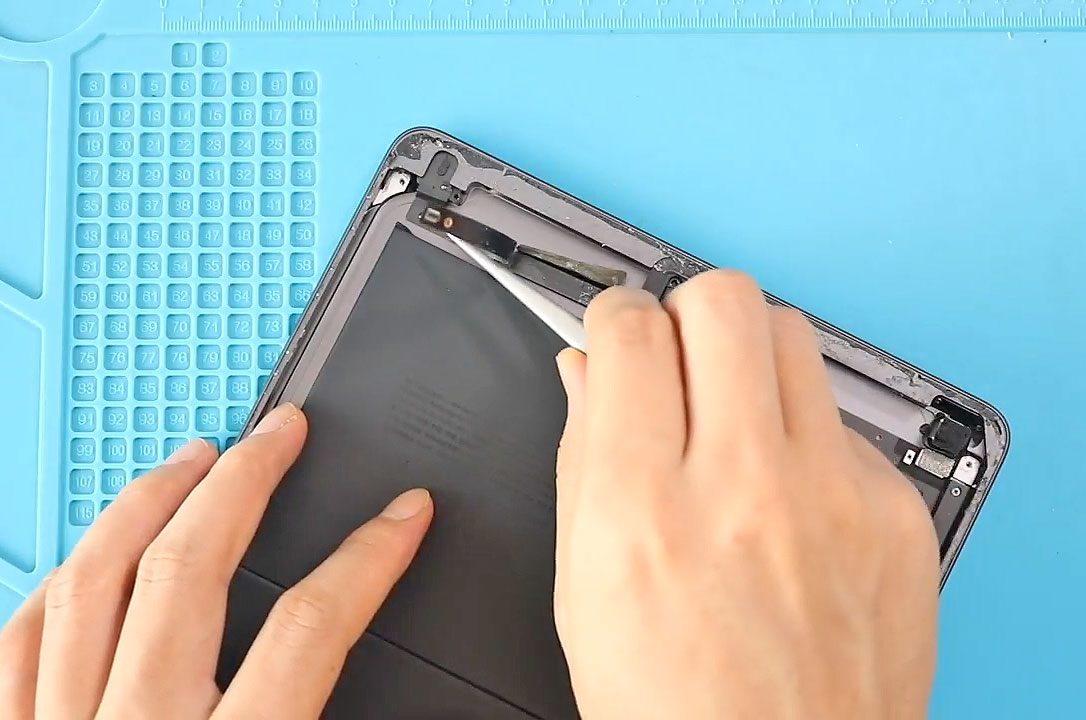
Step 7: Removing the Headphone Jack
- Loosen the adhesive securing the headphone jack flex
- Remove the screw located at the top-left
- Gently peel the cable while releasing the adhesive
- Remove the damaged headphone jack assembly
Step 8: Installing the New Headphone Jack
- Place the new headphone jack into position
- Secure it using the original screw
- Press down and secure the adhesive
- Reconnect the front camera flex cable
Step 9: Reassembly
- Reinstall the top shield and secure it with three screws
- Reconnect the digitizer flex cables
- Reconnect the Home Button flex
- Place the LCD back into position
- Reconnect the LCD flex and install the shield
- Secure the LCD using four screws
Step 10: Closing the iPad
- Ensure there is enough adhesive around the frame
- Use B7000 glue or pre-cut double-sided adhesive if needed
- Close the digitizer like closing a book
- Seat the bottom edge first, then the top
- Press along the sides evenly
- Ensure the Home Button clicks properly
We are using screen bonding clips to secure the screen to the frame.
If unavailable, you can use rubber bands and leave the device clamped for some time.
Hope you’ve enjoyed this iPad 8 Headphone Jack Replacement Guide.
If you have any questions, feel free to leave a comment.
Please like, share, and comment on our videos.
And don’t forget to hit the subscribe button for more repair guides.
FAQs
1. Is the headphone jack replaceable on iPad 8 (10.2″)?
Yes. The headphone jack is a separate flex cable and can be replaced without soldering.
2. Are iPad 7 and iPad 8 headphone jacks the same?
Yes, both models use compatible headphone jack flex assemblies.
3. Do I need to remove the battery for this repair?
No battery removal is required, but the LCD and digitizer must be disconnected first.
4. Will this repair affect FaceTime or the front camera?
No, as long as the front camera flex is reconnected properly.
5. Is soldering required to replace the headphone jack?
No soldering is needed. This is a plug-and-play replacement.
FAQs – After The Repair
1. Headphones not detected after replacement
Recheck the headphone jack connector and ensure the flex is seated correctly.
2. No audio from headphones but speakers work
Inspect the headphone jack flex for damage and ensure adhesive is not blocking contacts.
3. Front camera not working after repair
Confirm the front camera flex was reconnected before closing the device.
4. Audio cuts in and out
Make sure the headphone jack is properly aligned and secured with the screw.
5. Screen lifting after reassembly
Apply fresh adhesive such as B7000 glue or use pre-cut double-sided adhesive.


-
 01Samsung Galaxy A16 5G Battery Replacement | Full DIY Repair Guide
 -
02Samsung Galaxy A16 5G Screen Replacement | Step-by-Step Guide
-
03Google Pixel 6 Power Button Replacement Guide | Volume Button Flex Repair Guide- DIY Repair
-
04Samsung Galaxy A16 5G Back Cover & Camera Lens Frame Replacement Guide | DIY Repair
-
05Why a Heating Pad Is Essential for Mobile Phone Repairs (And How to Use it)
-
06How to Use a Heat Gun or Hair Dryer for Phone/Tablet Repairs
-
07Essential Repair Tools for Phone, Tablet & Laptop Repairs


